---
title: "Cloud Archive Swift - Unfreezing your data stored in the Public Cloud Archive"
description: "Find out how to unfreeze your archives"
url: https://docs.ovhcloud.com/en/guides/storage-and-backup/object-storage/pca-unlock
lang: en
lastUpdated: 2022-04-12
---
# Cloud Archive Swift - Unfreezing your data stored in the Public Cloud Archive

## Objective

Public Cloud Archive is a cold storage solution designed to host large volumes of data, with no size limit and very attractive pricing.

Since cold storage data is supposed to be rarely accessed, a retrieval request is required, implying a delay prior to recovering the data. This time period varies depending on the age of data and the frequency of data access.

## Requirements

- Unfreezing via the OVHcloud Control Panel:


***

### OVHcloud Control Panel Access

- **Direct link:** <ManagerLink to="/#/pci/projects">Public Cloud Projects</ManagerLink>
- **Navigation path:** <code className="action">Public Cloud</code> > Select your project

***


- Unfreezing via python-swiftclient:
  - [Preparing an environment for using the OpenStack API](/en/guides/public-cloud/cross-functional/compute-prepare-openstack-api-environment.md) by installing python-swiftclient
  - [Setting OpenStack environment variables](/en/guides/public-cloud/cross-functional/compute-set-openstack-environment-variables.md)

## Instructions

### Unfreezing your object from the Control Panel

Click on `Cloud Archive
` in the left-hand menu.
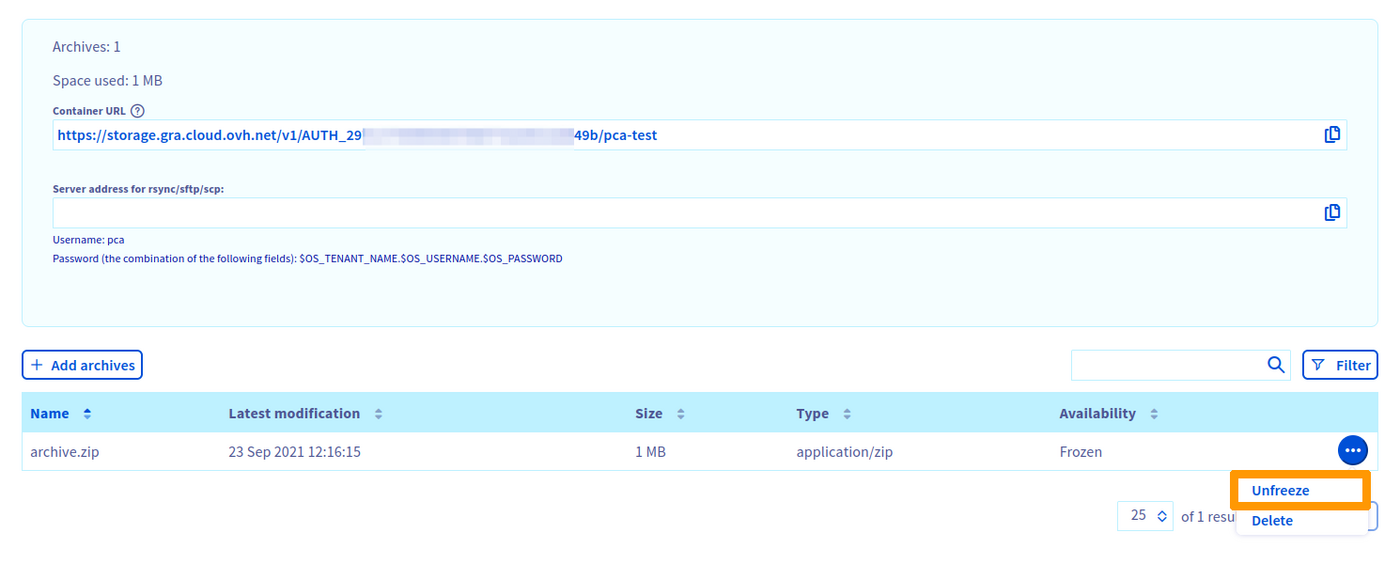
To unfreeze the archive, click on the button `...
` to the right of your archive, then `Unfreeze
` to start the retrieval process.
![Unfreeze](/images/storage-and-backup/object-storage/pca-unlock/unfreeze.png)
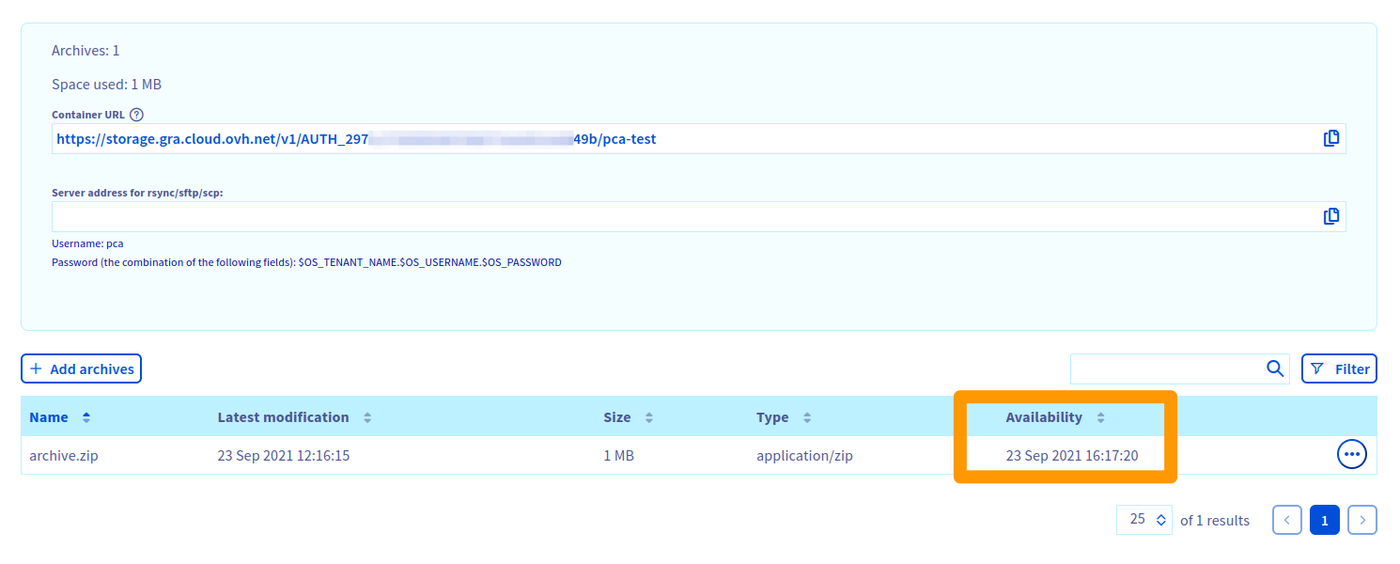
Once the process has started, the date and time your archive will be available is displayed in the `Availability` column.
![Unfreeze result](/images/storage-and-backup/object-storage/pca-unlock/unfreeze_result.png)
Your file will be ready for download after this time period. You can then start the download directly in your browser or via a [Swift/SFTP/SCP client](/en/guides/storage-and-backup/object-storage/pca-sftp.md).

### Unfreezing your object via python-swiftclient

Check the status of the object to download:

```bash
swift stat <pca_container> <object>
```

```
               Account: AUTH_702xxxxxxxxxxxxxxxxxxxxxxxxxxdaf
             Container: <pca_container>
                Object: <object>
          Content Type: text/plain
        Content Length: 746
         Last Modified: Tue, 10 Aug 2021 08:39:41 GMT
                  ETag: 51f122f524c46cafcf9628305db99144
            Meta Mtime: 1627974571.298786
         Accept-Ranges: bytes
 X-Ovh-Retrieval-State: sealed
           X-Timestamp: 1628584780.95458
            X-Trans-Id: txbb0eff9ebf9442eab0d02-0061123b5a
X-Openstack-Request-Id: txbb0eff9ebf9442eab0d02-0061123b5a
     X-Iplb-Request-Id: 6DBEFE1E:942A_3626E64B:01BB_61123B59_649EACF:8F28
       X-Iplb-Instance: 12308
```

The following line indicates that the object is frozen:

```
X-Ovh-Retrieval-State: sealed
```

Therefore, the `swift download` command will return a 429 error:

```bash
swift download <pca_container> <object>
```

```
Error downloading object '<pca_container>/<object>': Object GET failed: https://storage.gra.cloud.ovh.net/v1/AUTH_702xxxxxxxxxxxxxxxxxxxxxxxxxxdaf/<pca_container>/<object> 429 Too Many Requests
```

Relaunching the `swift stat` command:

```bash
swift stat <pca_container> <object>
```

```
               Account: AUTH_702xxxxxxxxxxxxxxxxxxxxxxxxxxdaf
             Container: <pca_container>
                Object: <object>
          Content Type: text/plain
        Content Length: 746
         Last Modified: Tue, 10 Aug 2021 08:39:41 GMT
                  ETag: 51f122f524c46cafcf9628305db99144
            Meta Mtime: 1627974571.298786
         Accept-Ranges: bytes
 X-Ovh-Retrieval-State: unsealing
           X-Timestamp: 1628584780.95458
 X-Ovh-Retrieval-Delay: 14313
            X-Trans-Id: tx9012d12434a447bd81528-0061123c54
X-Openstack-Request-Id: tx9012d12434a447bd81528-0061123c54
     X-Iplb-Request-Id: 6DBEFE1E:94D0_3626E64B:01BB_61123C54_6823B54:10ABF
       X-Iplb-Instance: 12309
```

The following line indicates that the object is being unfrozen:

```
X-Ovh-Retrieval-State: unsealing
```

The next line indicates the time period (in seconds) to wait before retrieving the object:

```bash
X-Ovh-Retrieval-Delay: 14313
```

Once the time period has elapsed:

```bash
swift stat <pca_container> <object>
```

```
               Account: AUTH_702xxxxxxxxxxxxxxxxxxxxxxxxxxdaf
             Container: <pca_container>
                Object: <object>
          Content Type: text/plain
        Content Length: 746
         Last Modified: Tue, 10 Aug 2021 08:39:41 GMT
                  ETag: 51f122f524c46cafcf9628305db99144
            Meta Mtime: 1627974571.298786
         Accept-Ranges: bytes
 X-Ovh-Retrieval-State: unsealed
           X-Timestamp: 1628584780.95458
            X-Trans-Id: txaf1eac9ceb8a45efb36e1-0061127482
X-Openstack-Request-Id: txaf1eac9ceb8a45efb36e1-0061127482
     X-Iplb-Request-Id: 6DBEFE1E:ACCC_3626E64B:01BB_61127482_E75B0:1B979
       X-Iplb-Instance: 38343
```

The following line indicates that the object is now unfrozen:

```
X-Ovh-Retrieval-State: unsealed
```

To download the object:

```bash
swift download <pca_container> <object>
```

```bash
swift download <pca_container> <object>
<object> [auth 0.961s, headers 1.767s, total 1.768s, 0.001 MB/s]
```

#### Automating the object download

:::info
This feature requires the `at` package.

:::

```bash
swift download <pca_container> <object>
```

```
Error downloading object '<pca_container>/<object>': Object GET failed: https://storage.gra.cloud.ovh.net/v1/AUTH_702xxxxxxxxxxxxxxxxxxxxxxxxxxdaf/<pca_container>/<object> 429 Too Many Requests
```

```bash
X_OVH_RETRIEVAL_DELAY=$(swift download <pca_container> <object> | awk -F ": " '/X-Ovh-Retrieval-Delay/ {print $2}'
RETRIEVAL_DELAY=$((${X_OVH_RETRIEVAL_DELAY} / 60 + 2))
swift download <pca_container> <object> | at now + ${RETRIEVAL_DELAY} minutes
```

## Go further

If you need training or technical assistance to implement our solutions, contact your sales representative or click on [this link](https://www.ovhcloud.com/en-gb/professional-services/) to get a quote and ask our Professional Services experts for assisting you on your specific use case of your project.

Join our [community of users](https://community.ovhcloud.com/).
