---
title: "Backup Agent - Deletion Procedure"
description: "Discover how to delete an agent, a vault or a Backup Agent tenant"
url: https://docs.ovhcloud.com/en/guides/storage-and-backup/backup-agent/deletion
lang: en
lastUpdated: 2026-02-03
---
# Backup Agent - Deletion Procedure
## Objective
**This guide explains how to delete different elements of your Backup Agent service: agents, vaults, and tenants.**
## Requirements
- An active Backup Agent service.
***
### OVHcloud Control Panel Access
- **Direct link:** Backup Agent
- **Navigation path:** Bare Metal Cloud > Backup Agent
***
## Instructions
### Delete an agent
:::info
**Behavior according to the agent's usage:**
- **If the agent has not been used to transfer data:** It can be deleted immediately. It will be disabled first, then deleted.
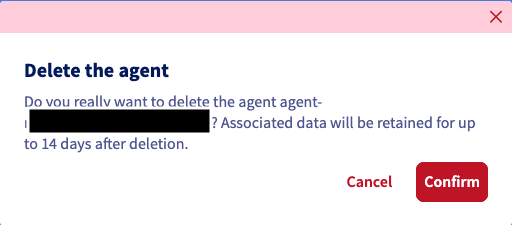
- **If data has been transferred:** We apply a suspension of the agent in the "Disabled" status for 14 days, allowing time for immutable data to be deleted.
:::
:::warning
Once your agent is suspended, you can no longer create a new agent on the same server. You must wait until the first agent is deleted.
:::
Go to the `Agents
` section and click on the delete button for the relevant agent.
Confirm the agent deletion in the window that appears.
### Delete a vault
:::warning
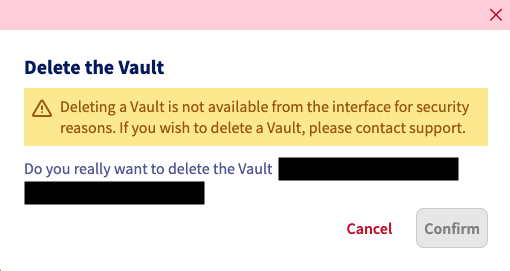
A vault cannot be deleted if it contains data. If you wish to delete a vault, you must [contact support](https://help.ovhcloud.com/csm?id=csm_get_help), who will perform checks with you before initiating the deletion.
:::
Go to the `Vaults
` section and click on the delete button for the relevant vault.
Confirm the deletion in the window that appears.
### Delete a tenant
:::warning
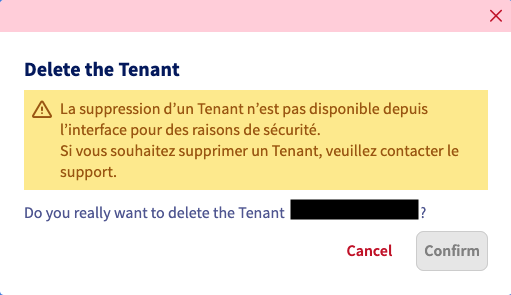
At the moment, a tenant cannot be deleted autonomously. If you wish to delete a tenant, you must [contact support](https://help.ovhcloud.com/csm?id=csm_get_help). We will process your request.
:::
Select your tenant and click on the delete button.
Confirm the deletion in the window that appears.
## Go further
Join our [community of users](https://community.ovhcloud.com/).