---
title: "Backup Agent - How Vaults work"
description: "Discover how the Vault system works and where your backup data is stored"
url: https://docs.ovhcloud.com/en/guides/storage-and-backup/backup-agent/backup-agent-vault
lang: en
lastUpdated: 2026-01-28
---
# Backup Agent - How Vaults work
## Objective
**This guide explains how the Vault system works in the Backup Agent product and how your data is located and stored depending on the location of your Bare Metal servers.**
## Requirements
- A Backup Agent service ordered at the time of ordering your Bare Metal server or later via the Backup Agent menu in your OVHcloud Control Panel.
***
### OVHcloud Control Panel Access
- **Direct link:** Backup Agent
- **Navigation path:** Bare Metal Cloud > Backup Agent
***
## Instructions
### Vault Overview
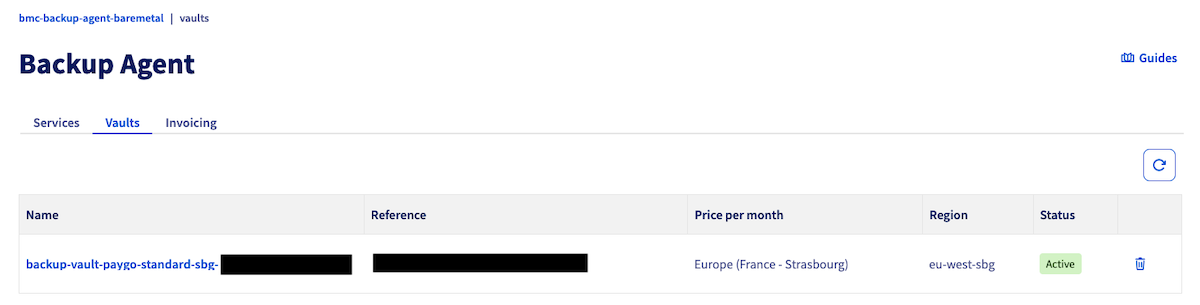
A Vault is your storage space where your backup data is sent during each backup. Vaults are automatically created by OVHcloud to ensure that your data is not hosted in the same datacenter as your Bare Metal server.
This is based on our Object Storage buckets, which you can find [here](https://www.ovhcloud.com/en-gb/public-cloud/object-storage/).
To find your Vaults, click this link
to access the `Backup Agent
` section, then click on the `Vaults
` tab.
### Location Principle
**Important Rule:** Backup data is always sent to a Vault located in a different datacenter from the one where your Bare Metal server is located. This ensures the resilience and security of your data.
### Use Cases
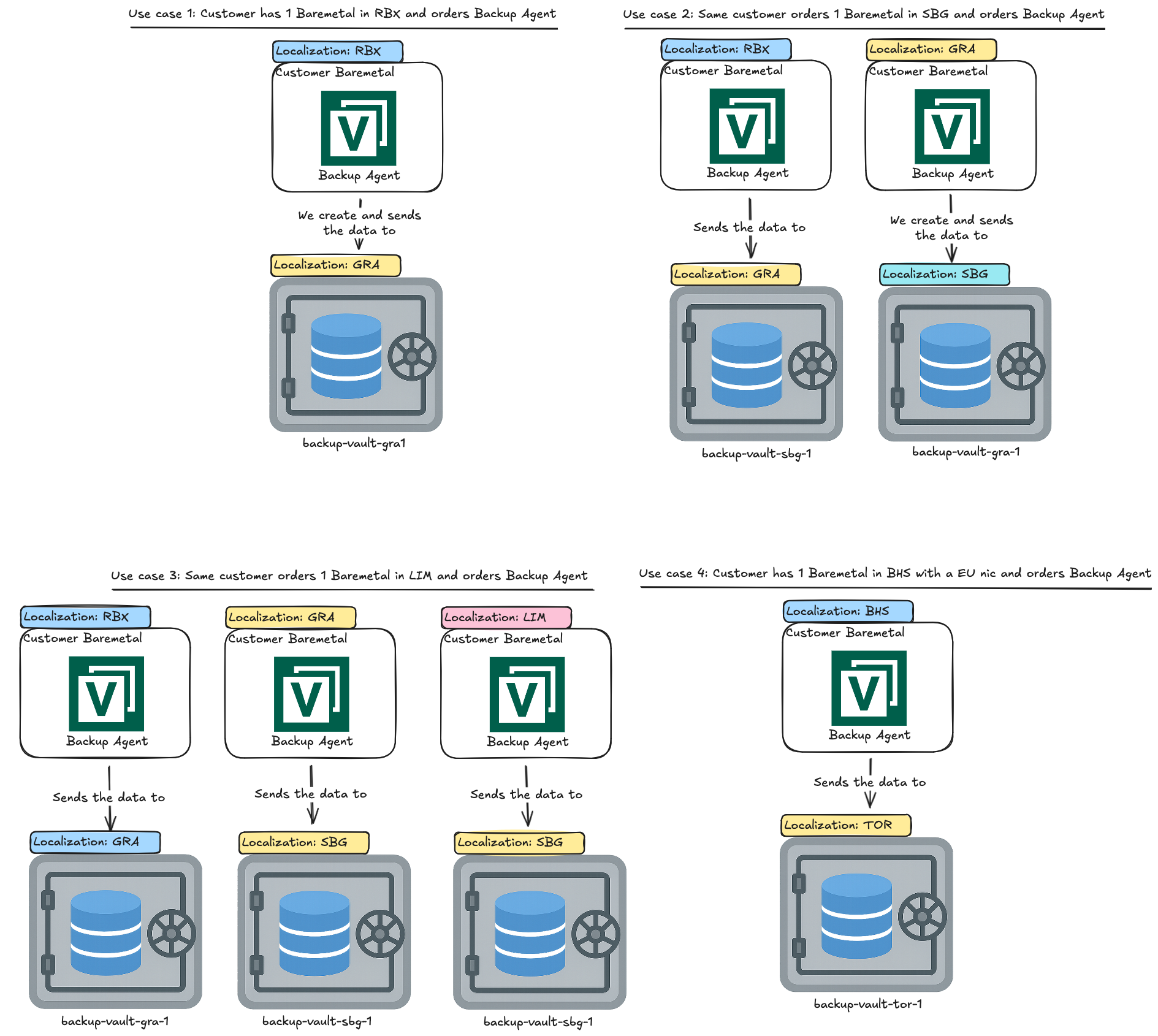
Here are various scenarios illustrating how the Vault system works:
### Use Case 1: A Bare Metal server in RBX
If you have a Bare Metal server located in **Roubaix (RBX)** and you order the Backup Agent:
- Your Bare Metal server with the Backup Agent installed is located in **RBX**.
- Your backup data is automatically sent to a Vault created in **Gravelines (GRA)**, named **backup-vault-gra-1**.
- This ensures that your data is stored in a different datacenter from your server.
### Use Case 2: Two Bare Metal servers in RBX and GRA
If you have two Bare Metal servers, one in **Roubaix (RBX)** and the other in **Gravelines (GRA)**:
- The Bare Metal server in **RBX** sends its data to **backup-vault-gra-1** in **Gravelines (GRA)**.
- The Bare Metal server in **GRA** sends its data to **backup-vault-sbg-1** in **Strasbourg (SBG)**.
- Each server uses a Vault in a different datacenter from its own.
### Use Case 3: Three Bare Metal servers in RBX, GRA and LIM
If you have three Bare Metal servers in different datacenters:
- The server in **RBX** sends its data to **backup-vault-gra-1** in **GRA**.
- The server in **GRA** sends its data to **backup-vault-sbg-1** in **SBG**.
- The server in **Limburg (LIM)** sends its data to **backup-vault-sbg-1** in **SBG**.
- Each server ensures that its data is stored in a distant datacenter.
### Use Case 4: Bare Metal server in BHS with EU NIC
If you have a Bare Metal server in **Beauharnois (BHS)** with a European network interface:
- Your Bare Metal server is located in **BHS**.
- Your backup data is sent to **backup-vault-tor-1** in **Toronto (TOR)**.
- The Vault location is determined based on your server's network configuration.
## Important Points
- Vaults are automatically created by OVHcloud; you cannot create them manually.
- You cannot change the Vault for an agent once it is configured.
- The Vault location is always different from your Bare Metal server location to ensure resilience.
- The Vault name generally follows the convention: `backup-vault--`.
## Go further
Join our [community of users](https://community.ovhcloud.com/).