---
title: "Creating a private registry with Pulumi"
description: "Create an OVHcloud Managed Private Registry (MPR) with Pulumi"
url: https://docs.ovhcloud.com/en/guides/public-cloud/containers-orchestration/managed-private-registry/creation-with-pulumi
lang: en
lastUpdated: 2026-02-25
---
# Creating a private registry with Pulumi
## Objective
You can create an OVHcloud Managed Private Registry via the OVHcloud Control Panel, but you can also deploy a registry programmatically with Infrastructure as Code (IaC) tools. This can be done via Terraform thanks to our OVHcloud provider, and now also with Pulumi.
### Pulumi

[Pulumi](https://www.pulumi.com/) is an Infrastructure as Code (IasC) tool that allows you to build your infrastructures with a programming language, in Golang for example.
Users define the desired state in Pulumi programs and Pulumi creates the desired resources.
Pulumi offers an intuitive command line interface (CLI), to provision, update or delete your infrastructure. If you are familiar with Docker Compose CLI and Terraform CLI, you will adopt [Pulumi CLI](https://www.pulumi.com/docs/cli/) too.
## Requirements
- A [Public Cloud project](/en/guides/public-cloud/cross-functional/create-a-public-cloud-project.md) in your OVHcloud account
- Installing the [Pulumi CLI](https://www.pulumi.com/docs/install/)
- An account in [Pulumi](https://www.pulumi.com/)
- A [Pulumi access token](https://app.pulumi.com/account/tokens)
- Installing the [kubectl CLI](https://kubernetes.io/docs/tasks/tools/)
***
### OVHcloud Control Panel Access
- **Direct link:** Public Cloud Projects
- **Navigation path:** Public Cloud > Select your project
***
### Before you begin
You should have installed the Pulumi CLI on your machine. Verify the Pulumi CLI is successfully installed in your machine with the `pulumi version` command.
You should have a result like this:
```bash
$ pulumi version
v3.86.0
```
#### OVHcloud Pulumi provider
In order to create a Private Registry (Harbor instance) and other resources, you will use the [OVHcloud Pulumi provider](https://github.com/ovh/pulumi-ovh). This provider is a bridge to our official [Terraform provider](https://registry.terraform.io/providers/ovh/ovh/latest).
All available Pulumi resources have their definition and [documentation](https://www.pulumi.com/registry/packages/ovh).
In this guide, we will create several resources:
- a [capabilities datasource](https://www.pulumi.com/registry/packages/ovh/api-docs/cloudproject/getcapabilitiescontainerregistry/) that represents the configuration of the registry
- a [registry resource](https://www.pulumi.com/registry/packages/ovh/api-docs/cloudproject/containerregistry/) that represents an OVHcloud Managed Private Registry
- a [registry user resource](https://www.pulumi.com/registry/packages/ovh/api-docs/cloudproject/containerregistryuser/) that represents a user in the private registry
You will also use the [Harbor Pulumi provider](https://www.pulumi.com/registry/packages/harbor/) to create a project inside the private registry (harbor).
#### Getting your registry/API tokens information
The “OVH provider” needs to be configured with a set of credentials, which can be set using [Pulumi stack configuration](https://www.pulumi.com/docs/concepts/config/) or environment variables:
- `ovh:endpoint` (environment variable: `OVH_ENDPOINT`)
- `ovh:applicationKey` (environment variable: `OVH_APPLICATION_KEY`)
- `ovh:applicationSecret` (secret) (environment variable: `OVH_APPLICATION_SECRET`)
- `ovh:consumerKey` (environment variable: `OVH_CONSUMER_KEY`)
**Why?**
Behind the scenes, the provider is doing requests to OVHcloud APIs.
In order to retrieve this necessary information, please follow our [first steps with the OVHcloud APIs](/en/guides/manage-and-operate/api/first-steps.md) guide.
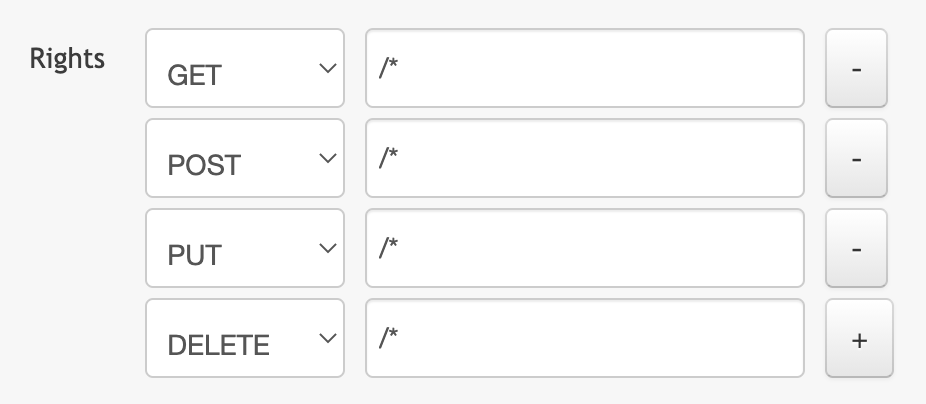
In concrete terms, you have to generate these credentials via the [OVH token generation page](https://api.ovh.com/createToken/?GET=/*\&POST=/*\&PUT=/*\&DELETE=/*) with the following rights:
When you have successfully generated your OVH tokens, please save them as you will have to use them in the coming minutes.
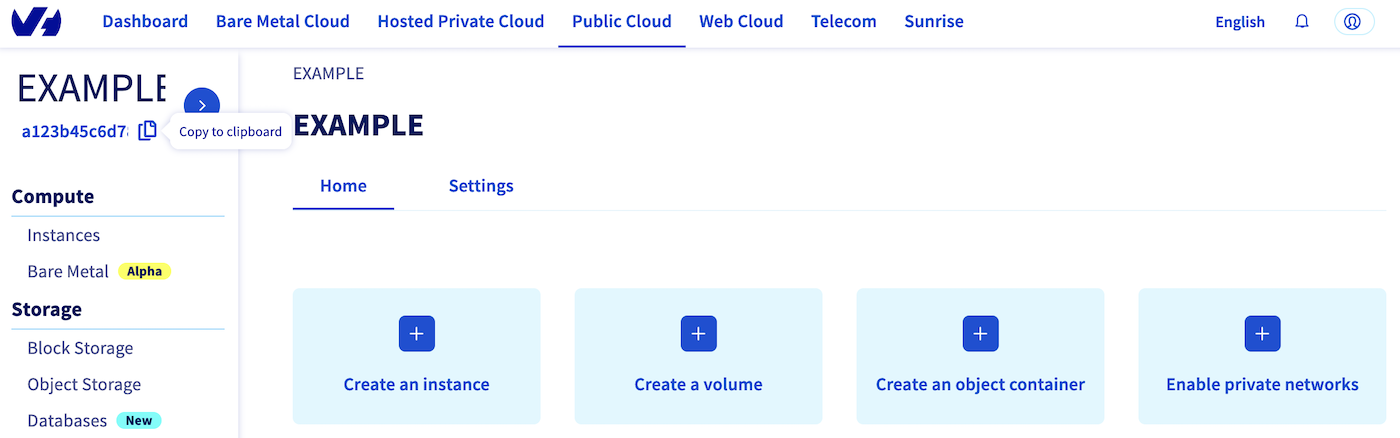
The last needed information is the `serviceName`: it is the ID of your Public Cloud project.
**How to get it?**
In the Public Cloud section, you can retrieve your service name ID thanks to the `Copy to clipboard
` button.
Define the secret keys as environment variables:
```bash
export OVH_ENDPOINT="ovh-eu"
export OVH_APPLICATION_KEY="xxx"
export OVH_APPLICATION_SECRET="xxx"
export OVH_CONSUMER_KEY="xxx"
```
:::info
Replace `xxx` by the correct values and `ovh-eu` with the correct endpoint.
:::
## Instructions
One advantage of Pulumi is that it allows you to build your infrastructures with the programming language of your choice. It supports a variety of programming languages.
In this tutorial you will be able to deploy your private registry (harbor) with a user and its project in the Go/Golang programming language.
For your information, our OVH Pulumi provider currently supports Go but also Python, Node.js/Typescript and C#/Dotnet.
Examples:
- [Python](https://github.com/ovh/pulumi-ovh/tree/main/examples/kubernetes/ovh-python)
- [Typescript](https://github.com/ovh/pulumi-ovh/tree/main/examples/kubernetes/ovh-typescript)
- [C#](https://github.com/ovh/pulumi-ovh/tree/main/examples/kubernetes/ovh-csharp)
- [Go](https://github.com/ovh/pulumi-ovh/tree/main/examples/kubernetes/ovh-go)
### Deploy your Managed Private Registry (MPR) in Go / Golang
#### Pulumi project creation and initialization
In Pulumi, the infrastructure is organized into projects. In the Pulumi ecosystem, a project represents a Pulumi program which, when run, declares the desired infrastructure for Pulumi to manage.
First, create a folder named `ovh-registry-go` which represents our project and go into it.
```bash
mkdir ovh-registry-go
cd ovh-registry-go
```
Initialize your project:
```bash
pulumi new go -y
```
The output should be like this:
```bash
$ pulumi new go -y
Created project 'ovh-registry-go'
Please enter your desired stack name.
To create a stack in an organization, use the format / (e.g. `acmecorp/dev`).
Created stack 'dev'
Installing dependencies...
Finished installing dependencies
Your new project is ready to go!
To perform an initial deployment, run `pulumi up`
```
The command creates a `dev` stack and the code organization of your project:
```bash
$ tree
.
├── go.mod
├── go.sum
├── main.go
└── Pulumi.yaml
```
Now you need to install the Pulumi OVH provider.
```bash
go get github.com/ovh/pulumi-ovh/sdk/go/...
```
And the Pulumi Harbor provider:
```bash
go get github.com/pulumiverse/pulumi-harbor/sdk/v3/go/...
```
In order to create an OVHcloud Managed Private Registry, you need to define the `serviceName`.
```bash
pulumi config set serviceName
```
Or you can edit the `Pulumi.yaml` file with the following content:
```yaml
config:
serviceName:
```
:::info
Replace `` by your Public Cloud project.
:::
Then, edit the `main.go` file and replace the content with the following:
```go
package main
import (
"github.com/ovh/pulumi-ovh/sdk/go/ovh/cloudproject"
"github.com/pulumi/pulumi/sdk/v3/go/pulumi"
"github.com/pulumi/pulumi/sdk/v3/go/pulumi/config"
"github.com/pulumiverse/pulumi-harbor/sdk/v3/go/harbor"
)
func main() {
pulumi.Run(func(ctx *pulumi.Context) error {
serviceName := config.Require(ctx, "serviceName")
// Initiate the configuration of the registry
regcap, err := cloudproject.GetCapabilitiesContainerFilter(ctx, &cloudproject.GetCapabilitiesContainerFilterArgs{
ServiceName: serviceName,
PlanName: "SMALL",
Region: "GRA",
}, nil)
if err != nil {
return err
}
// Deploy a new Managed private registry
myRegistry, err := cloudproject.NewContainerRegistry(ctx, "my-registry", &cloudproject.ContainerRegistryArgs{
ServiceName: pulumi.String(regcap.ServiceName),
PlanId: pulumi.String(regcap.Id),
Region: pulumi.String(regcap.Region),
})
if err != nil {
return err
}
// Create a User
myRegistryUser, err := cloudproject.NewContainerRegistryUser(ctx, "user", &cloudproject.ContainerRegistryUserArgs{
ServiceName: pulumi.String(regcap.ServiceName),
RegistryId: myRegistry.ID(),
Email: pulumi.String("myuser@ovh.com"),
Login: pulumi.String("myuser"),
})
if err != nil {
return err
}
//Add as an output registry information
ctx.Export("registryID", myRegistry.ID())
ctx.Export("registryName", myRegistry.Name)
ctx.Export("registryURL", myRegistry.Url)
ctx.Export("registryVersion", myRegistry.Version)
ctx.Export("registryUser", myRegistryUser.User)
ctx.Export("registryPassword", myRegistryUser.Password)
//Use the created regsitry to initiate the harbor provider
harborProvider, err := harbor.NewProvider(ctx, "harbor", &harbor.ProviderArgs{
Username: myRegistryUser.User,
Password: myRegistryUser.Password,
Url: myRegistry.Url,
}, pulumi.DependsOn([]pulumi.Resource{myRegistry, myRegistryUser}))
if err != nil {
return err
}
// Create a public project in your harbor registry
project, err := harbor.NewProject(ctx, "project", &harbor.ProjectArgs{
Name: pulumi.String("my-new-project"),
Public: pulumi.String("true"),
}, pulumi.Provider(harborProvider))
if err != nil {
return err
}
ctx.Export("project", project.Name)
return nil
})
}
```
This Go program will create an OVHcloud Managed Private registry:
- named `my-registry-` followed by a random ID
- in the `GRA` region
- with a `SMALL` plan
- in your Public Cloud project (depending on the `serviceName` you defined)
A registry user:
- named `myuser`
- with `myuser@ovh.com` email address
And a project inside the created registry:
- named `my-new-project`
- with `Public` visibility
Then, run the `go mod tidy` command to ask Go to download and install the necessary Go providers and dependencies.
```bash
go mod tidy
```
#### Create your Private Registry (Harbor) through Pulumi
Now you can deploy your registry. To do that, just execute the `pulumi up` command.
This will display the plan/the preview of the desired state. You will be prompted to choose the stack (`dev` by default) and to confirm that you want to perform/apply the changes.
```bash
$ pulumi up
Previewing update (dev)
View in Browser (Ctrl+O): https://app.pulumi.com/scraly/ovh-registry-go/dev/previews/xxxxxxxx-xxxx-xxxx-xxxx-xxxxxxxxxxxx
Type Name Plan
+ pulumi:pulumi:Stack ovh-registry-go-dev create
+ ├─ ovh:CloudProject:ContainerRegistry my-registry create
+ ├─ ovh:CloudProject:ContainerRegistryUser user create
+ ├─ pulumi:providers:harbor harbor create
+ └─ harbor:index:Project project create
Outputs:
project : output
registryID : output
registryName : "my-registry-be6ba67"
registryPassword: output
registryURL : output
registryUser : output
registryVersion : output
Resources:
+ 5 to create
Do you want to perform this update? yes
Updating (dev)
View in Browser (Ctrl+O): https://app.pulumi.com/scraly/ovh-registry-go/dev/updates/1
Type Name Status
+ pulumi:pulumi:Stack ovh-registry-go-dev created (146s)
+ ├─ ovh:CloudProject:ContainerRegistry my-registry created (141s)
+ ├─ ovh:CloudProject:ContainerRegistryUser user created (1s)
+ ├─ pulumi:providers:harbor harbor created (0.39s)
+ └─ harbor:index:Project project created (0.96s)
Outputs:
project : "my-new-project"
registryID : "xxxxxxxx-xxxx-xxxx-xxxx-xxxxxxxxxxxx"
registryName : "my-registry-be6ba67"
registryPassword: [secret]
registryURL : "https://034nl9k0.c1.gra9.container-registry.ovh.net"
registryUser : "myuser"
registryVersion : "2.14.2"
Resources:
+ 5 created
Duration: 2m30s
```
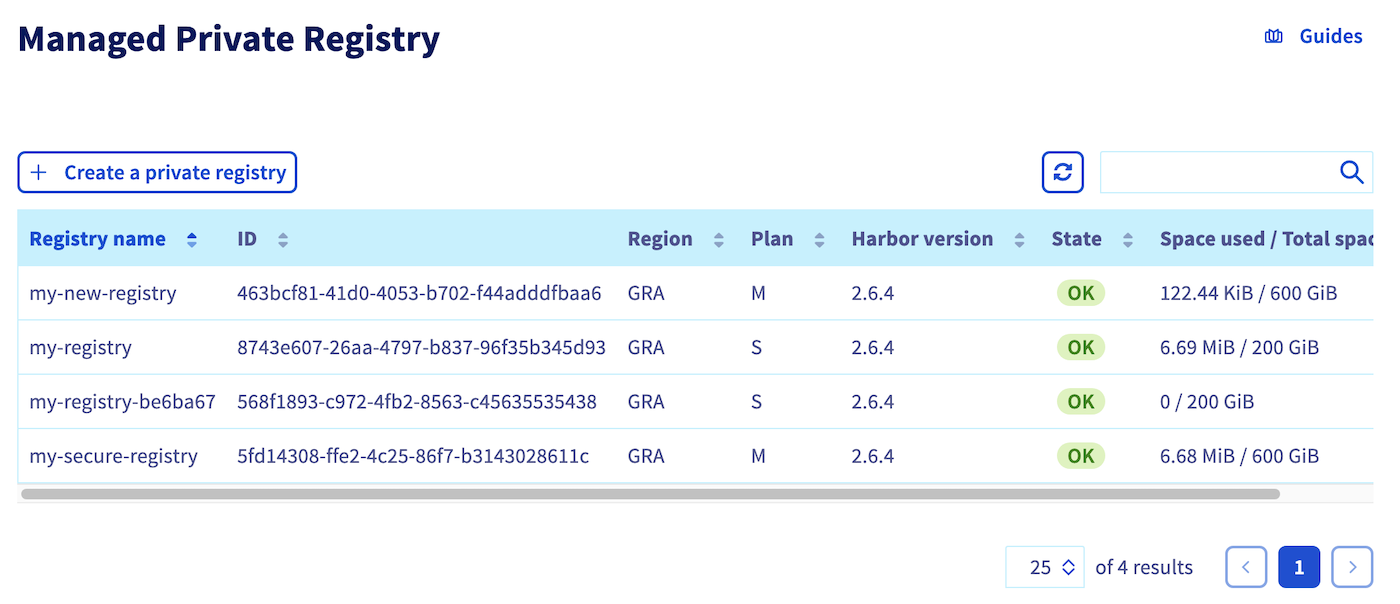
Go to the `Managed Private Registry
` section. Your registry has been successfully created:
#### Connect to the registry
Your registry is created with a user, so you have all the information to connect to it.
In order to do this, retrieve the registry URL, login and password from the `dev` Pulumi stack:
```bash
pulumi stack output registryURL -s dev
pulumi stack output registryUser -s dev
pulumi stack output registryPassword --show-secrets -s dev
```
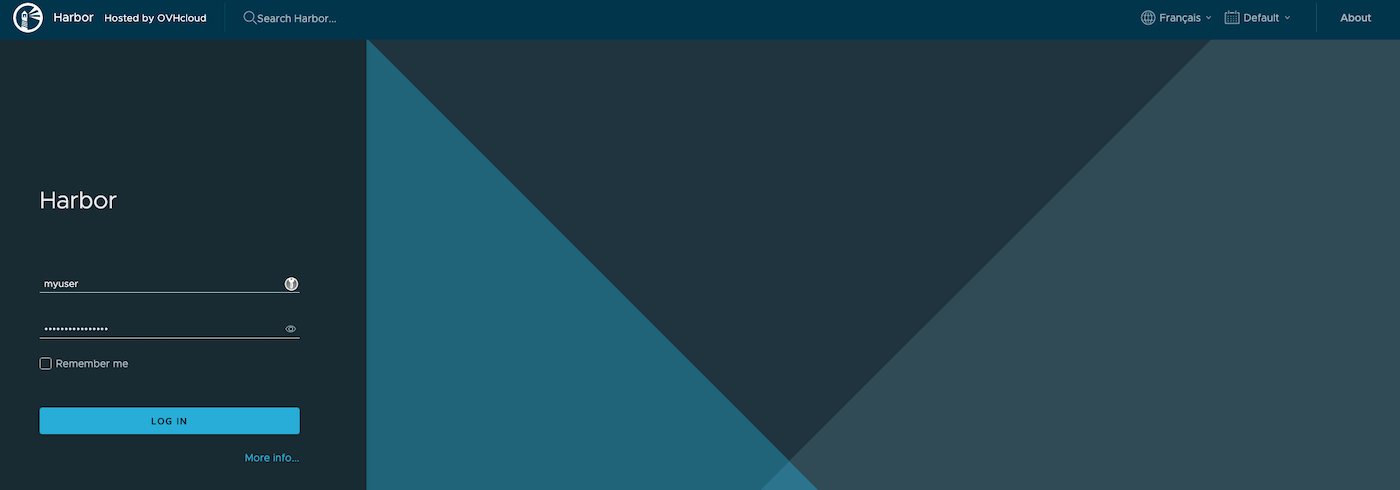
Connect to the Managed Private Registry with the login and password:
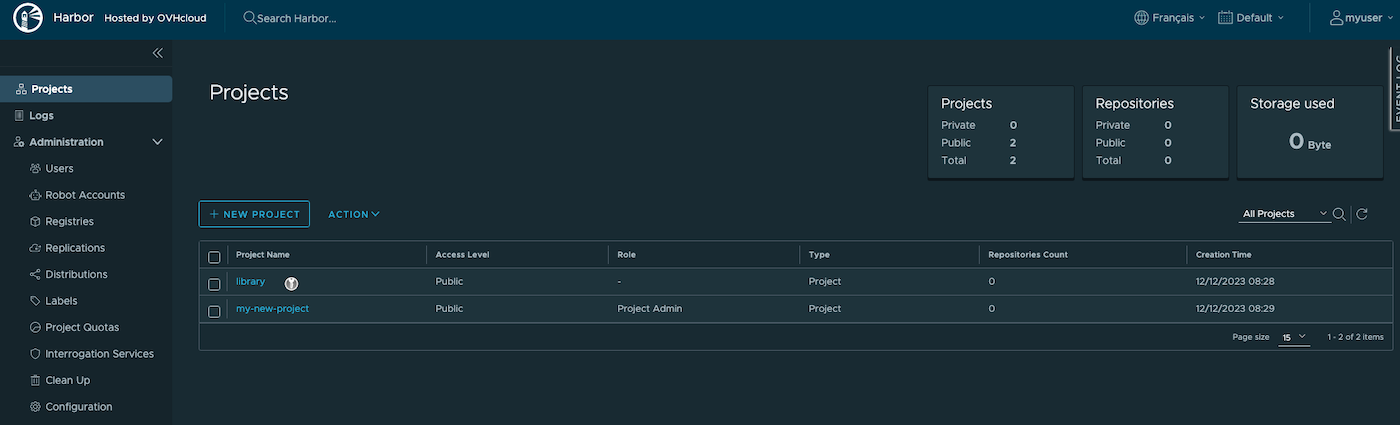
Then click on the created project:
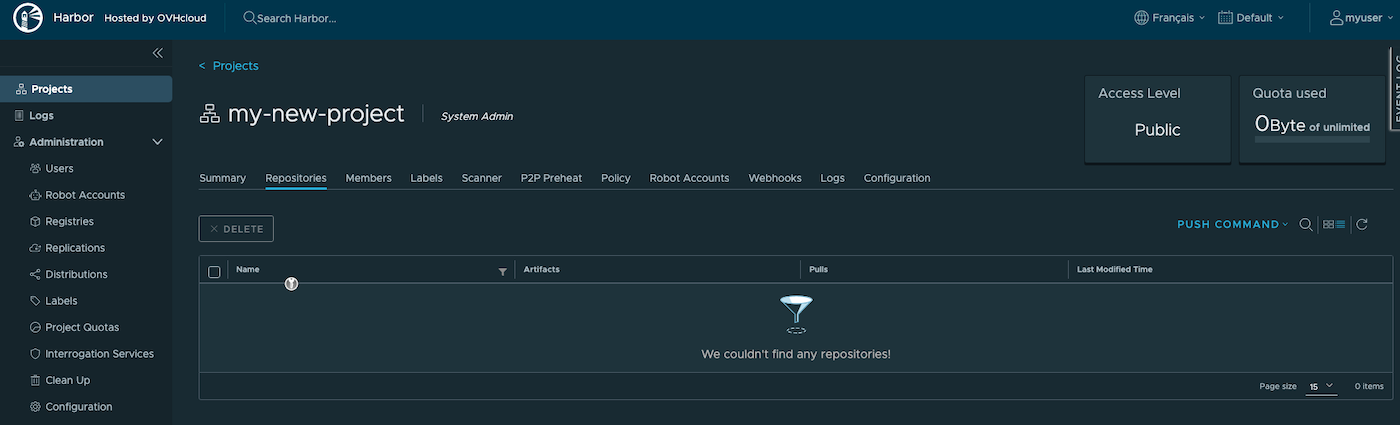
You can now deploy your applications and/or create new clusters through Pulumi.
## Known issues
### "Provider is missing a required configuration key"
If you encounter the following error, it means you forgot to export the needed OVHcloud environment variables.
```bash
$ pulumi up
Previewing update (dev)
View in Browser (Ctrl+O): https://app.pulumi.com/scraly/ovh-registry-go/dev/previews/xxxxxxxx-xxxx-xxxx-xxxx-xxxxxxxxxxxx
Type Name Plan Info
pulumi:pulumi:Stack ovh-registry-go-dev
└─ pulumi:providers:ovh default_github_/api.github.com/ovh/pulumi-ovh 1 error
Diagnostics:
pulumi:providers:ovh (default_github_/api.github.com/ovh/pulumi-ovh):
error: pulumi:providers:ovh resource 'default_github_/api.github.com/ovh/pulumi-ovh' has a problem: Provider is missing a required configuration key, try `pulumi config set ovh:endpoint`: The OVH API endpoint to target (ex: "ovh-eu").
```
The solution is to export the missing required configuration:
```bash
export OVH_ENDPOINT="ovh-eu"
export OVH_APPLICATION_KEY="xxx"
export OVH_APPLICATION_SECRET="xxx"
export OVH_CONSUMER_KEY="xxx"
```
:::info
Replace `xxx` by the correct values and `ovh-eu` with the correct endpoint.
:::
## Destroy (cleanup)
If you want to easily destroy created resources, you can use the `pulumi destroy` command.
```bash
$ pulumi destroy
Previewing destroy (dev)
View in Browser (Ctrl+O): https://app.pulumi.com/scraly/ovh-registry-go/dev/previews/xxxxxxxxx-xxxx-xxxx-xxxx-xxxxxxxxxxxx
Type Name Plan
- pulumi:pulumi:Stack ovh-registry-go-dev delete
- ├─ harbor:index:Project project delete
- ├─ pulumi:providers:harbor harbor delete
- ├─ ovh:CloudProject:ContainerRegistryUser user delete
- └─ ovh:CloudProject:ContainerRegistry my-registry delete
Outputs:
- project : "my-new-project"
- registryID : "xxxxxxxx-xxxx-xxxx-xxxx-xxxxxxxxxxxx"
- registryName : "my-registry-be6ba67"
- registryPassword: [secret]
- registryURL : "https://034nl9k0.c1.gra9.container-registry.ovh.net"
- registryUser : "myuser"
- registryVersion : "2.14.2"
Resources:
- 5 to delete
Do you want to perform this destroy? yes
Destroying (dev)
View in Browser (Ctrl+O): https://app.pulumi.com/scraly/ovh-registry-go/dev/updates/2
Type Name Status
- pulumi:pulumi:Stack ovh-registry-go-dev deleted
- ├─ harbor:index:Project project deleted (1s)
- ├─ pulumi:providers:harbor harbor deleted (0.22s)
- ├─ ovh:CloudProject:ContainerRegistryUser user deleted (1s)
- └─ ovh:CloudProject:ContainerRegistry my-registry deleted (10s)
Outputs:
- project : "my-new-project"
- registryID : "xxxxxxxx-xxxx-xxxx-xxxx-xxxxxxxxxxxx"
- registryName : "my-registry-be6ba67"
- registryPassword: [secret]
- registryURL : "https://034nl9k0.c1.gra9.container-registry.ovh.net"
- registryUser : "myuser"
- registryVersion : "2.14.2"
Resources:
- 5 deleted
Duration: 16s
The resources in the stack have been deleted, but the history and configuration associated with the stack are still maintained.
If you want to remove the stack completely, run `pulumi stack rm dev`.
```
Your OVHcloud Managed registry, the user and the project have been correctly destroyed.
## Go further
Join our [community of users](https://community.ovhcloud.com/).