---
title: "Configuring kubectl on an OVHcloud Managed Kubernetes cluster"
description: "Find out how to retrieve the kubectl configuration file to interact with an OVHcloud Managed Kubernetes cluster."
url: https://docs.ovhcloud.com/en/guides/public-cloud/containers-orchestration/managed-kubernetes/configure-kubectl
lang: en
lastUpdated: 2022-04-27
---
# Configuring kubectl on an OVHcloud Managed Kubernetes cluster
## Objective
The OVHcloud Managed Kubernetes service gives you access to Kubernetes clusters, without the hassle of installing or operating them.
This guide will cover how to retrieve the `kubectl` configuration file to interact with an OVHcloud Managed Kubernetes cluster.
## Requirements
- A [Public Cloud project](https://www.ovhcloud.com/en-gb/public-cloud/) in your OVHcloud account.
- You must have an OVHcloud Managed Kubernetes cluster.
- You must have the [`kubectl`](https://kubernetes.io/docs/reference/kubectl/overview/) command-line tool installed.
You can find the detailed installation instructions for `kubectl` in Kubernetes' [official documentation](https://kubernetes.io/docs/home/).
***
### OVHcloud Control Panel Access
- **Direct link:** Public Cloud Projects
- **Navigation path:** Public Cloud > Select your project
***
## Instructions
### Step 1 - Configure the default settings for kubectl
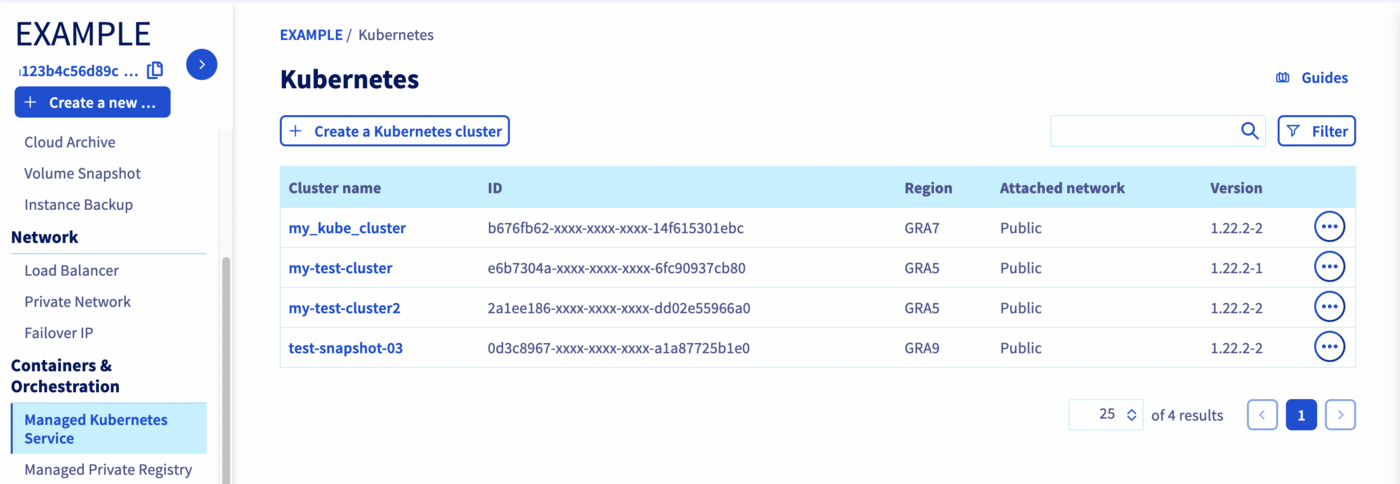
Access the administration UI for your OVHcloud Managed Kubernetes clusters by clicking on `Managed Kubernetes Service
` in the left-hand menu.
Then, click on one of your Kubernetes cluster in the tab.
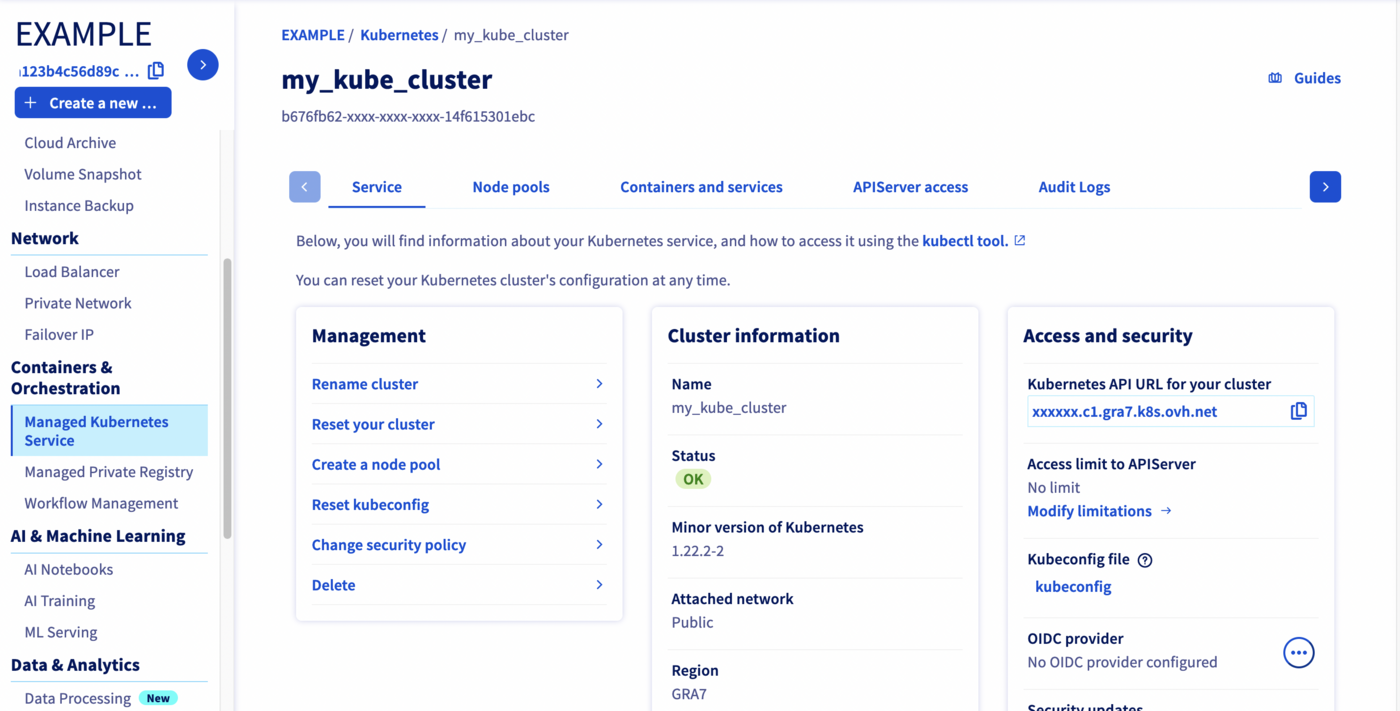
Then, click on `kubeconfig
` to download the `kubectl`
configuration file:
How kubeconfig files are loaded?
- 1. from the --kubeconfig flag, is specified
- 2. from the `KUBECONFIG` environment variable, if set
- 3. from the `$HOME/.kube/config` file, by default
So, after downloading it, if you want to use this configuration file by default in `kubectl`, you can save it with the filename `config` in the `$HOME/.kube/` directory. Alternatively, you can place it in your working directory, with either the `KUBECONFIG` environment variable or the `--kubeconfig` flag.
In this example, we are using the `KUBECONFIG` environment variable method.
#### For MacOS or Linux:
Type the following command into your terminal:
```
export KUBECONFIG=/Users/myuser/.kube/my-test-cluster.yml
```
#### For Windows 7, 10 and 11 :
1. From the Windows menu or Cortana search bar, search for "Modify system environment variables".
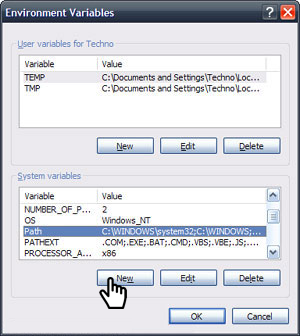
2. In the System Properties window, click on the _Advanced_ tab, then click the _Environment Variables_ button near the bottom.
3. In the window that opens (pictured below), add a new variable, `KUBECONFIG`, with the path to the `kube-config` file as its value.
You can also add the variable for the current shell process with this command :
```
set KUBECONFIG=my-test-cluster.yml
```
### Step 2 - Verify that _kubectl_ can connect to the cluster
You can verify that `kubectl` is able to interact with the cluster by using it to send a `cluster-info` command:
```
kubectl cluster-info
```
The cluster should return a response with some key information about itself:
```console
$ kubectl cluster-info
Kubernetes control plane is running at https://xxxxxx.c2.gra.k8s.ovh.net
CoreDNS is running at https://xxxxxx.c2.gra.k8s.ovh.net/api/v1/namespaces/kube-system/services/kube-dns:dns/proxy
Metrics-server is running at https://xxxxxx.c2.gra.k8s.ovh.net/api/v1/namespaces/kube-system/services/https:metrics-server:/proxy
To further debug and diagnose cluster problems, use 'kubectl cluster-info dump'.
```
### Define the access for several Kubernetes clusters
You can also specify several kubeconfig files in your `KUBECONFIG` environment variable, separated by a colon (`:`).
```
export KUBECONFIG=/Users/myuser/.kube/my-test-cluster.yml:/Users/myuser/.kube/my-test-cluster2.yml
```
### Switch to a different cluster
You can switch between different clusters by using the `kubectl config
` command.
```console
$ kubectl config use-context kubernetes-admin@my-test-cluster
Switched to context "kubernetes-admin@my-test-cluster".
$ kubectl config use-context kubernetes-admin@my-test-cluster2
Switched to context "kubernetes-admin@my-test-cluster2".
```
Or you can install and use [kubectx](https://github.com/ahmetb/kubectx).
## Go further
To deploy your first application on your Kubernetes cluster, we suggest you refer to our guide to [Deploying an application](/en/guides/public-cloud/containers-orchestration/managed-kubernetes/deploy-application.md).
- If you need training or technical assistance to implement our solutions, contact your sales representative or click on [this link](https://www.ovhcloud.com/en-gb/professional-services/) to get a quote and ask our Professional Services experts for assisting you on your specific use case of your project.
- Join our [community of users](https://community.ovhcloud.com/).