---
title: "AI Endpoints - Integration with Pydantic AI"
description: "Find out how to build production-grade AI applications with Pydantic AI and OVHcloud AI Endpoints"
url: https://docs.ovhcloud.com/en/guides/public-cloud/ai-machine-learning/ai-endpoints-pydantic-ai-integration
lang: en
lastUpdated: 2026-01-29
---
# AI Endpoints - Integration with Pydantic AI
:::info
AI Endpoints is covered by the [OVHcloud AI Endpoints conditions](https://storage.gra.cloud.ovh.net/v1/AUTH_325716a587c64897acbef9a4a4726e38/contracts/48743bf-AI_Endpoints-ALL-1.1.pdf) and the [OVHcloud Public Cloud special conditions](https://storage.gra.cloud.ovh.net/v1/AUTH_325716a587c64897acbef9a4a4726e38/contracts/d2a208c-Conditions_particulieres_OVH_Stack-WE-9.0.pdf).
:::
**New integration available:** We're excited to announce a new integration for [AI Endpoints](https://www.ovhcloud.com/en-gb/public-cloud/ai-endpoints/) with [Pydantic AI](https://ai.pydantic.dev/). This integration allows you to build production-grade applications with Generative AI using Pydantic's data validation and type safety, and continues our commitment to integrating AI Endpoints into as many open-source tools as possible to simplify its usage.
## Objective
OVHcloud [AI Endpoints](https://www.ovhcloud.com/en-gb/public-cloud/ai-endpoints/) allows developers to easily add AI features to their day-to-day developments.
In this guide, we will show how to use [Pydantic AI](https://ai.pydantic.dev/) to integrate OVHcloud [AI Endpoints](https://www.ovhcloud.com/en-gb/public-cloud/ai-endpoints/) into your Python applications for building type-safe, production-ready AI agents.
With Pydantic AI's agent framework and OVHcloud's scalable AI infrastructure, you can quickly build reliable applications that leverage Pydantic's validation capabilities to ensure structured and type-safe interactions with LLMs.
## Definition
- [Pydantic AI](https://ai.pydantic.dev/): A Python agent framework designed to build production-grade applications with Generative AI. It leverages Pydantic for data validation and type safety, ensuring structured and reliable interactions with LLMs. Pydantic AI provides a simple yet powerful API for creating AI agents with built-in validation, error handling, and type checking.
- [AI Endpoints](https://www.ovhcloud.com/en-gb/public-cloud/ai-endpoints/): A serverless platform by OVHcloud providing easy access to a variety of world-renowned AI models including Mistral, LLaMA, and more. This platform is designed to be simple, secure, and intuitive with data privacy as a top priority.
### Why is this integration important?
This new integration offers you several advantages:
- **Type Safety**: Leverage Pydantic's validation to ensure structured, validated outputs from LLMs.
- **Production-Ready**: Built-in error handling, retry logic, and validation for reliable applications.
- **Simplicity**: Create AI agents in just a few lines of code.
- **Flexibility**: Use any OVHcloud AI model in your Pydantic AI applications.
- **Models**: All of our models are available through Pydantic AI.
## Requirements
Before getting started, make sure you have:
- An OVHcloud account with access to AI Endpoints.
- Python 3.8 or higher installed.
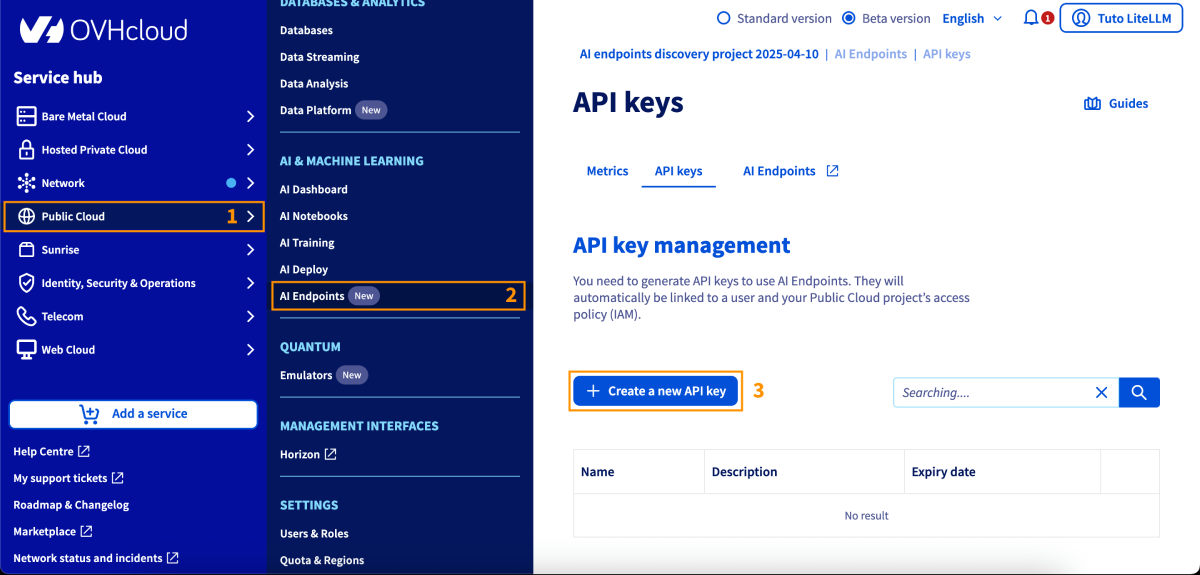
- An API key generated from the OVHcloud Control Panel, in the Public Cloud section > `AI Endpoints` > API keys.
## Instructions
### Installation
Install Pydantic AI via pip:
```bash
pip install pydantic-ai
```
Or using uv:
```bash
uv add pydantic-ai
```
You are now ready to get started.
### Basic configuration
#### Environment variables
The recommended method to configure your API key is using environment variables:
```bash
export OVHCLOUD_API_KEY="your-api-key"
```
Or use a `.env` file:
```bash
OVHCLOUD_API_KEY=your-api-key
```
### Basic usage
Here's a simple usage example - you're ready in less than 5 lines of code:
```python
from pydantic_ai import Agent
agent = Agent('ovhcloud:gpt-oss-120b')
result = agent.run_sync('What is the capital of France?')
print(result.output)
```
#### Using custom provider configuration
If you need to configure the provider explicitly, you can use the `OVHcloudProvider` class:
```python
from pydantic_ai import Agent
from pydantic_ai.models.openai import OpenAIChatModel
from pydantic_ai.providers.ovhcloud import OVHcloudProvider
model = OpenAIChatModel(
'gpt-oss-120b',
provider=OVHcloudProvider(api_key='your-api-key'),
)
agent = Agent(model)
result = agent.run_sync('What is the capital of France?')
print(result.output)
```
### Advanced features
#### Structured output with Pydantic models
Use Pydantic models to get validated, structured outputs:
```python
from pydantic import BaseModel
from pydantic_ai import Agent
class LocationInfo(BaseModel):
city: str
country: str
population: int
capital: bool
agent = Agent('ovhcloud:gpt-oss-120b', result_type=LocationInfo)
result = agent.run_sync(
'Extract information about Paris: it is the capital of France with a population of about 2.1 million.'
)
print(result.data)
# LocationInfo(city='Paris', country='France', population=2100000, capital=True)
```
#### System prompts and context
Add system prompts and context to guide your agent:
```python
from pydantic_ai import Agent
agent = Agent(
'ovhcloud:gpt-oss-120b',
system_prompt='You are a helpful assistant specialized in geography.',
)
result = agent.run_sync(
'What are the three largest cities in France?',
message_history=[
{'role': 'user', 'content': 'Tell me about France'},
{'role': 'assistant', 'content': 'France is a country in Western Europe...'},
],
)
print(result.output)
```
#### Async operations
Use async/await for better performance in concurrent applications:
```python
import asyncio
from pydantic_ai import Agent
async def main():
agent = Agent('ovhcloud:gpt-oss-120b')
result = await agent.run('What is the capital of France?')
print(result.output)
# Run multiple queries concurrently
results = await asyncio.gather(
agent.run('What is the capital of France?'),
agent.run('What is the capital of Germany?'),
agent.run('What is the capital of Italy?'),
)
for result in results:
print(result.output)
asyncio.run(main())
```
#### Function calling / tool use
Enable agents to call functions for extended capabilities:
```python
from pydantic import BaseModel
from pydantic_ai import Agent
from pydantic_ai.tools import tool
class WeatherRequest(BaseModel):
location: str
unit: str = "celsius"
@tool
def get_weather(request: WeatherRequest) -> str:
"""Get the current weather for a location."""
# Simulated weather function
if request.unit == "celsius":
return f"The weather in {request.location} is sunny, 22°C"
else:
return f"The weather in {request.location} is sunny, 72°F"
agent = Agent(
'ovhcloud:gpt-oss-120b',
tools=[get_weather],
)
result = agent.run_sync('What is the weather like in Paris?')
print(result.output)
```
#### Streaming responses
Stream responses for real-time user experience:
```python
from pydantic_ai import Agent
agent = Agent('ovhcloud:gpt-oss-120b')
for event in agent.run_stream('Write a short story about a robot learning to cook.'):
if event.event == 'result':
print(event.data.output)
elif event.event == 'stream_token':
print(event.data, end='', flush=True)
```
#### Error handling and retries
Configure error handling and retry logic:
```python
from pydantic_ai import Agent
from pydantic_ai.exceptions import PydanticAIError
agent = Agent(
'ovhcloud:gpt-oss-120b',
retries=3,
retry_delay=1.0,
)
try:
result = agent.run_sync('What is the capital of France?')
print(result.output)
except PydanticAIError as e:
print(f"Error: {e}")
```
#### Custom model configuration
Configure model parameters for fine-tuned behavior:
```python
from pydantic_ai import Agent
from pydantic_ai.models.openai import OpenAIChatModel
from pydantic_ai.providers.ovhcloud import OVHcloudProvider
model = OpenAIChatModel(
'gpt-oss-120b',
provider=OVHcloudProvider(api_key='your-api-key'),
temperature=0.7,
max_tokens=500,
top_p=0.9,
)
agent = Agent(model)
result = agent.run_sync('Generate three creative business ideas for sustainable fashion.')
print(result.output)
```
### Available models
OVHcloud AI Endpoints offers a wide range of models accessible via Pydantic AI. For the complete and up-to-date list, visit our [model catalog](https://www.ovhcloud.com/en-gb/public-cloud/ai-endpoints/catalog/).
## Go further
You can find more information about Pydantic AI on their [official documentation](https://ai.pydantic.dev/). You can also browse the [AI Endpoints catalog](https://www.ovhcloud.com/en-gb/public-cloud/ai-endpoints/catalog/) to explore the models that are available through Pydantic AI.
For detailed information about Pydantic AI features, including advanced agent patterns and best practices, visit the [Pydantic AI documentation](https://ai.pydantic.dev/).
Browse the full [AI Endpoints documentation](/en/guides/public-cloud/ai-machine-learning/overview.md) to further understand the main concepts and get started.
If you need training or technical assistance to implement our solutions, contact your sales representative or click on [this link](https://www.ovhcloud.com/en-gb/professional-services/) to get a quote and ask our Professional Services experts for a custom analysis of your project.
## Feedback
Please feel free to send us your questions, feedback, and suggestions regarding AI Endpoints and its features:
- In the #ai-endpoints channel of the OVHcloud [Discord server](https://discord.gg/ovhcloud), where you can engage with the community and OVHcloud team members.
- Join the [Pydantic community](https://logfire.pydantic.dev/docs/join-slack/) for questions about Pydantic AI.