---
title: "Configuring an OVHcloud Load Balancer service with redirects"
description: "Integrate your web services behind a Load Balancer with redirects"
url: https://docs.ovhcloud.com/en/guides/network/load-balancer/create-redirectlocation
lang: en
lastUpdated: 2025-11-27
---
# Configuring an OVHcloud Load Balancer service with redirects
## Objective
The **OVHcloud Load Balancer** operates by default as a proxy. It can also be configured to redirect client traffic to a third-party website. This functionality is essential for scenarios such as **domain name migration** or enforcing the **HTTPS version** of a website. This is known as **HTTP redirection**.
**This guide outlines the process for integrating your web services behind an OVHcloud Load Balancer utilizing HTTP redirections.**
## Requirements
- Have an [OVHcloud Load Balancer](https://www.ovhcloud.com/en-gb/network/load-balancer/) offer in your OVHcloud account.
- Have access to your OVHcloud Control Panel.
- Have access to the [OVHcloud API](https://eu.api.ovh.com/).
## Instructions
### Overview
An HTTP redirect looks like this:
```bash
HTTP/1.1 301 Moved Permanently
Location: http://www.example.org/
Content-Type: text/html
Content-Length: 174
```
Custom redirects must be formatted as `:///;?#`. Only one redirect can be specified per frontend.
Custom redirects can be specified via the OVHcloud Control Panel or via the API, on a new or existing frontend.
### Adding a custom redirect from the OVHcloud Control Panel
You can define a custom redirect from the OVHcloud Control Panel
in the `Bare Metal Cloud
` section and then `Load Balancer
`.
This can be done either on a new frontend during its creation, or on an existing frontend.
#### Adding a new frontend
In the `Frontends
` section, click on the `Add a frontend
` button to create a new one.
In the frontend editing page, select the `HTTP
` or `HTTPS
` protocol.
Configure the information as usual. However, it is unnecessary to specify the `Default backend
`, as it will not be used.
In the advanced settings, fill in the `HTTP redirect
`.
#### Editing an existing frontend
In the `Frontends
` section, click on the `...
` button to the right of the relevant frontend and select `Edit
`.
Make sure the selected frontend is of the `HTTP`
or `HTTPS`
protocol. Complete the configuration if necessary.
However, it is unnecessary to specify the `Default backend
`, as it will not be used.
In the advanced settings, fill in the `HTTP redirect
`.
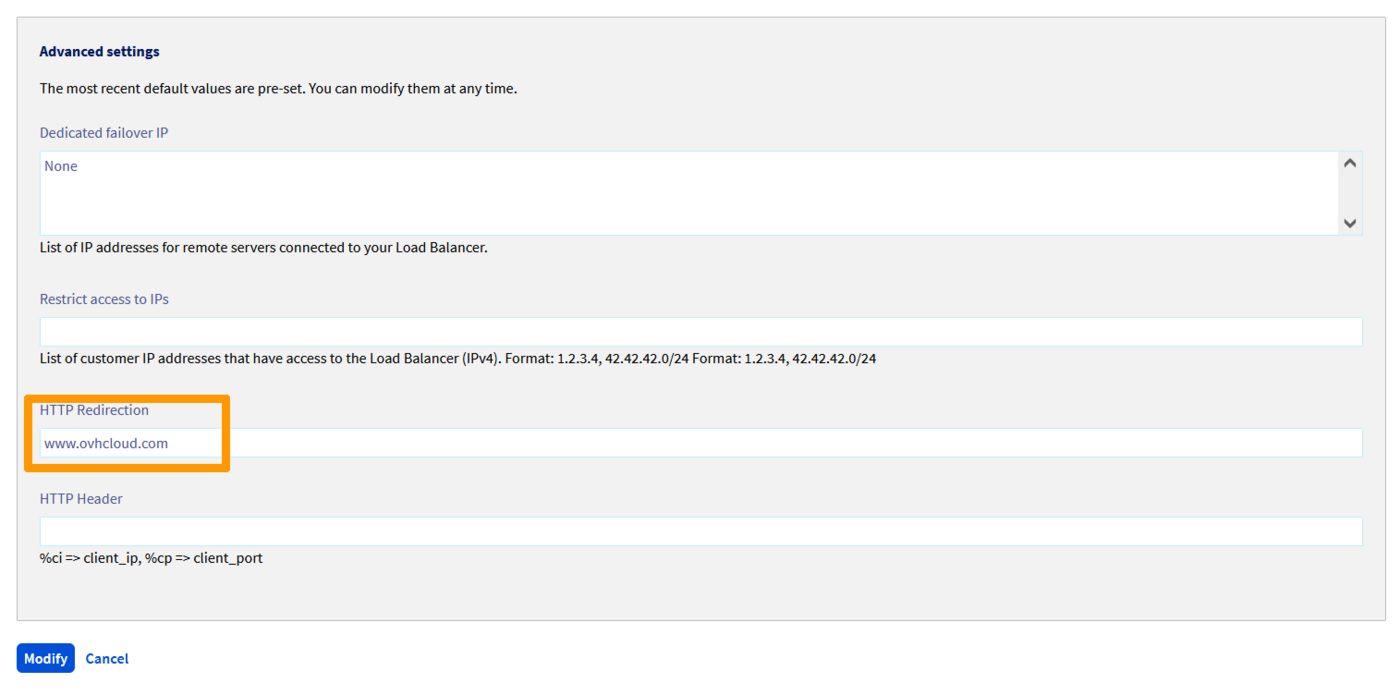
Once the frontend is configured, click on `Add
` or `Edit
` depending on whether you are configuring a new frontend or an existing one.
Do not forget to deploy the configuration.
To do this, you can either:
- In the `Status` section of the Home tab, click on the ... button of your Load Balancer and then click on Apply the configuration.
- In the reminder banner informing you that the configuration is not applied, click on Apply the configuration.

### Adding a custom redirect from the OVHcloud API
In the [OVHcloud API](https://eu.api.ovh.com/), redirects are specified in the redirectLocation string:
**Creating a new frontend**
🇪🇺EU▾
[POST/ipLoadbalancing/{serviceName}/http/frontend](https://eu.api.ovh.com/console/?section=/ipLoadbalancing&branch=v1#post-/ipLoadbalancing/-serviceName-/http/frontend)
| Parameter | Meaning |
| ---------------- | ---------------------------------------- |
| serviceName | Identifier of your Load Balancer service |
| port | Port(s) of the frontend |
| zone | Deployment zone of the frontend |
| redirectLocation | HTTP redirect URL |
**Updating an existing frontend**
🇪🇺EU▾
[PUT/ipLoadbalancing/{serviceName}/http/frontend/{frontendId}](https://eu.api.ovh.com/console/?section=/ipLoadbalancing&branch=v1#put-/ipLoadbalancing/-serviceName-/http/frontend/-frontendId-)
| Parameter | Meaning |
| ---------------- | ---------------------------------------- |
| serviceName | Identifier of your Load Balancer service |
| frontendId | Identifier of the frontend to update |
| redirectLocation | HTTP redirect URL |
**Applying the changes**
🇪🇺EU▾
[POST/ipLoadbalancing/{serviceName}/refresh](https://eu.api.ovh.com/console/?section=/ipLoadbalancing&branch=v1#post-/ipLoadbalancing/-serviceName-/refresh)
| Parameter | Meaning |
| ----------- | ---------------------------------------- |
| serviceName | Identifier of your Load Balancer service |
| zone | Deployment zone of the frontend |
## Go further
Join our [community of users](https://community.ovhcloud.com/).