---
title: "Associating an email with a vSphere user"
description: "Learn how to associate an email address with your vSphere user"
url: https://docs.ovhcloud.com/en/guides/hosted-private-cloud/powered-by-vmware/vsphere-edit-user
lang: en
lastUpdated: 2020-07-07
---
# Associating an email with a vSphere user
## Objective
You can associate a name, first name, phone number, and email address with a vSphere user in your Private Cloud. The email address allows validation by token.
**Learn how to associate an email address with your vSphere user.**
***
### OVHcloud Control Panel Access
- **Direct link:** [VMware vSphere](https://manager.eu.ovhcloud.com/#/dedicated/dedicated_cloud)
- **Navigation path:** Hosted Private Cloud > Managed VMware vSphere > Select your vSphere service
***
## Requirements
- a [Hosted Private Cloud infrastructure](https://www.ovhcloud.com/en-gb/enterprise/products/hosted-private-cloud/)
- access to the OVHcloud Control Panel
## Instructions
In your OVHcloud Control Panel
go to the section `Hosted Private Cloud`
. Click on `Private Cloud`
in the service bar on the left and select your infrastructure.
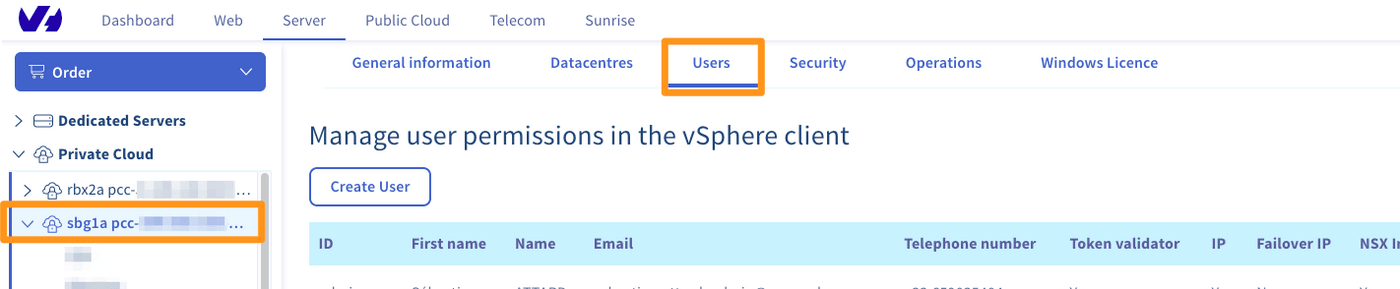
Go to the tab `Users
`, click on `...
` to the right of the user concerned and then click `Edit
`.

The following window appears:
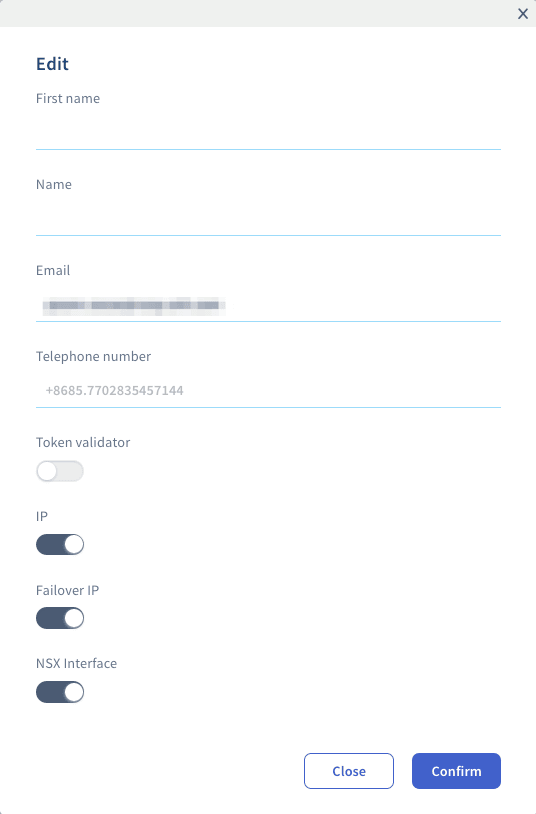
You can set your name, first name, phone number and email address.
This window also allows you to add editing rights to **IP**, **Additional IP**, **NSX Interface** and the **Token validator** used to approve certain sensitive actions on infrastructures that have the **Advanced Security** option enabled.
Click on `Confirm
` to validate the modifications.
## Go further
Join our community of users on [https://community.ovh.com/en/](https://community.ovh.com/en/).