---
title: "IAM for VMware on OVHcloud - How to create an IAM vSphere role"
description: "Find out how to create an IAM vSphere role for Hosted Private Cloud - VMware on OVHcloud"
url: https://docs.ovhcloud.com/en/guides/hosted-private-cloud/powered-by-vmware/vmware-iam-role
lang: en
lastUpdated: 2024-05-23
---
# IAM for VMware on OVHcloud - How to create an IAM vSphere role
:::info
IAM is currently in beta phase. This guide can be updated in the future with the advances of our teams in charge of this product.
:::
## Objective
**In this guide, we will explain how to create an IAM role in Hosted Private Cloud - VMware on OVHcloud**.
***
### OVHcloud Control Panel Access
- **Direct link:** [VMware vSphere](https://manager.eu.ovhcloud.com/#/dedicated/dedicated_cloud)
- **Navigation path:** Hosted Private Cloud > Managed VMware vSphere > Select your vSphere service
***
## Requirements
- An [OVHcloud account](/en/guides/account-and-service-management/account-information/ovhcloud-account-creation.md).
- One or more Hosted Private Cloud - VMware on OVHcloud products linked to this account (Hosted Private Cloud powered by VMware, VMware Service Pack).
- IAM enabled for your Hosted Private Cloud service - VMware on OVHcloud. Follow the steps in the guide [IAM for VMware on OVHcloud - How to enable IAM](/en/guides/hosted-private-cloud/powered-by-vmware/vmware-iam-activation.md).
## Instructions
By default, you have 2 vSphere IAM roles. The creation of an additional role is therefore optional.
We will explain how to create an additional role.
### Creating an IAM role via the OVHcloud Control Panel
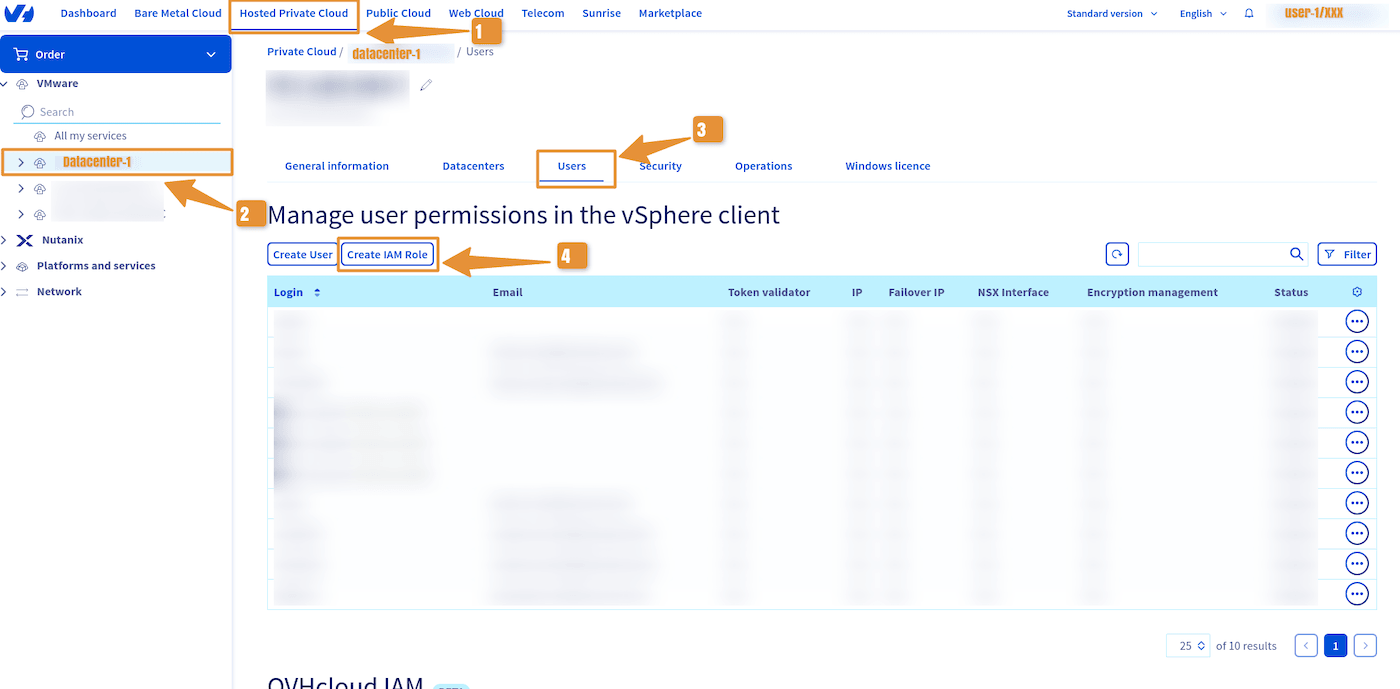
Log in to your OVHcloud Control Panel
and click the `Hosted Private Cloud
` tab.
Click the `VMware
` section, select your infrastructure, then go to the `Users
` tab.
Click `Create IAM Role
`.
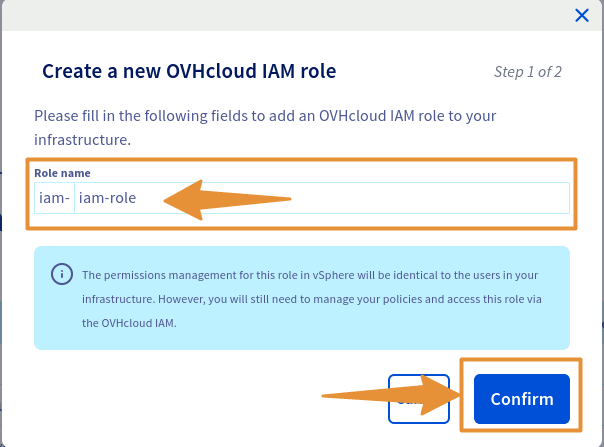
In the window that pops up, enter the name of your role, then click `Confirm
`.
:::info
IAM roles are automatically prefixed with `iam-`.
:::
You can then edit the group rights in the same way as with a vSphere local user.
#### Creating an IAM role via the OVHcloud API
:::tip
Read the guide [Getting started with OVHcloud APIs](/en/guides/manage-and-operate/api/first-steps.md) to get familiar with using OVHcloud APIv6.
:::
Execute the following API call:
🇪🇺EU▾
[POST/dedicatedCloud/{serviceName}/iam/addRole](https://eu.api.ovh.com/console/?section=/dedicatedCloud&branch=v1#post-/dedicatedCloud/-serviceName-/iam/addRole)
:::warning
Make sure to replace the `serviceName` with the reference of your Hosted Private Cloud service, in the form `pcc-XXX-XXX-XXX-XXX`.
:::
API return:
```shell
{
"userId": null,
"maintenanceDateTo": null,
"parentTaskId": null,
"datacenterId": null,
"network": null,
"createdBy": null,
"state": "todo",
"hostId": null,
"endDate": null,
"networkAccessId": null,
"maintenanceDateFrom": null,
"name": "addUser",
"vlanId": null,
"description": null,
"filerId": null,
"executionDate": "2024-05-15T14:21:17+02:00",
"createdFrom": null,
"taskId": 56446627,
"orderId": null,
"type": "generic",
"progress": 0,
"lastModificationDate": "2024-05-15T14:21:17+02:00"
}
```
:::info
IAM roles are automatically prefixed with `iam-`.
:::
## Go further
You can now follow the steps in the guide [IAM for VMware on OVHcloud - How to associate a role with a global IAM policy](/en/guides/hosted-private-cloud/powered-by-vmware/vmware-iam-role-policy.md).
**IAM for VMware on OVHcloud - Guide index:**
- Guide 1: [IAM for VMware on OVHcloud - Overview and FAQ](/en/guides/hosted-private-cloud/powered-by-vmware/vmware-iam-getting-started.md)
- Guide 2: [IAM for VMware on OVHcloud - How to enable IAM](/en/guides/hosted-private-cloud/powered-by-vmware/vmware-iam-activation.md)
- Guide 3: IAM for VMware on OVHcloud - How to create an IAM vSphere role
- Guide 4: [IAM for VMware on OVHcloud - How to associate a vSphere role with an IAM policy](/en/guides/hosted-private-cloud/powered-by-vmware/vmware-iam-role-policy.md)
- Guide 5: [IAM for VMware on OVHcloud - How to associate a user with a global IAM policy](/en/guides/hosted-private-cloud/powered-by-vmware/vmware-iam-user-policy.md)
If you need training or technical assistance to implement our solutions, contact your sales representative or click on [this link](https://www.ovhcloud.com/en-gb/professional-services/) to get a quote and ask our Professional Services experts for a custom analysis of your project.
Join our [community of users](https://community.ovhcloud.com/community/en).