---
title: "IAM for VMware on OVHcloud - How to associate a vSphere role with an IAM policy"
description: "Find out how to link a vSphere role to an IAM policy"
url: https://docs.ovhcloud.com/en/guides/hosted-private-cloud/powered-by-vmware/vmware-iam-role-policy
lang: en
lastUpdated: 2024-05-23
---
# IAM for VMware on OVHcloud - How to associate a vSphere role with an IAM policy
:::info
IAM is currently in beta phase. This guide can be updated in the future with the advances of our teams in charge of this product.
:::
## Objective
**This guide details how to create or modify a global IAM policy and add a vSphere role**.
***
### OVHcloud Control Panel Access
- **Direct link:** [IAM Policies](https://manager.eu.ovhcloud.com/#/iam/policies/myPolicies)
- **Navigation path:** Identity, Security & Operations > Policies
***
## Requirements
- An [OVHcloud account](/en/guides/account-and-service-management/account-information/ovhcloud-account-creation.md).
- One or more Hosted Private Cloud products - VMware on OVHcloud linked to this account (Hosted Private Cloud powered by VMware, VMware Service Pack).
- IAM enabled for your Hosted Private Cloud service - VMware on OVHcloud. Follow the steps in the guide [IAM for VMware on OVHcloud - How to enable IAM](/en/guides/hosted-private-cloud/powered-by-vmware/vmware-iam-activation.md).
## Instructions
### Creating or editing a policy
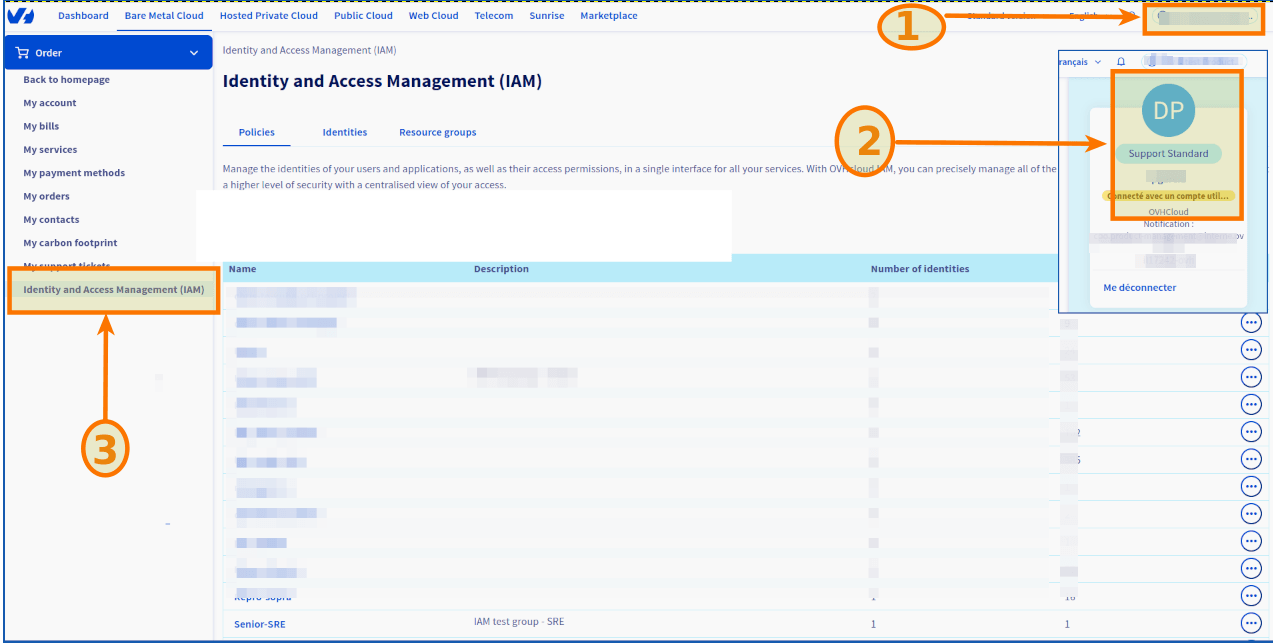
Log in to your OVHcloud Control Panel
. Click on your name in the top right-hand corner of the OVHcloud Control Panel, then click on your initials to go to the `My account
` section.
Under `My account
`, click `Identity and Access Management (IAM)`
{.action].
Click `Create a Policy
`.
To modify a policy, click the `...
` button to the right of the policy concerned, then `Modify policy
`.
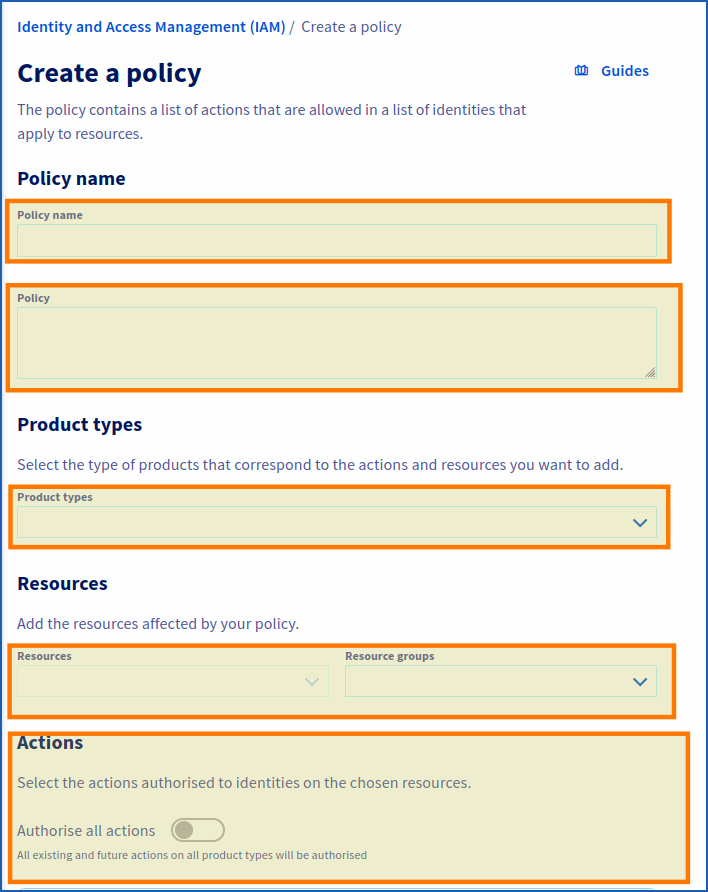
Enter the requested settings:
- **Policy name**: Choose a name.
- **Description**: Enter a description for your policy.
- **Product types**: Hosted private cloud powered by VMware / VMware Service Pack.
- **Resources**: Add the resources concerned by your policy (**pcc-XX-XX-XX-XX/servicepack**, **pcc-XX-XX-XX-XX**, etc.)
- **Actions**: This is where you add your role (see below).
#### Adding an IAM role to a global policy
When enabling IAM in vSphere, two roles are added by default (`iam-admin`, `iam-auditor`).
Copy the roles from the code section below, paste them into the field labeled "Actions added manually" under the “Actions” section, then click the `Add +
` button.
```bash
pccVMware:vSphere:assumeRole?iam-admin
pccVMware:vSphere:assumeRole?iam-auditor
```
If you have created an additional IAM role (after following the steps in the guide “[IAM for VMware on OVHcloud - How to create an IAM vSphere role](/en/guides/hosted-private-cloud/powered-by-vmware/vmware-iam-role.md)”), you can also add it by copying the code below and adapting it to your role:
```bash
pccVMware:vSphere:assumeRole?{role_name}
```
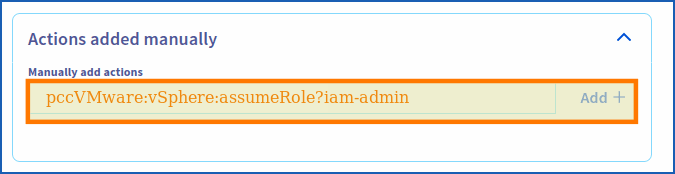
Be sure to click the `Add +
` button to add the action.
Finally, click `Create policy
` (or `Modify policy
` if applicable).
## Go further
You can now follow the steps in the guide [IAM for VMware on OVHcloud - How to associate a user with a global IAM policy](/en/guides/hosted-private-cloud/powered-by-vmware/vmware-iam-user-policy.md).
**IAM for VMware on OVHcloud - Guide index:**
- Guide 1: [IAM for VMware on OVHcloud - Overview and FAQ](/en/guides/hosted-private-cloud/powered-by-vmware/vmware-iam-getting-started.md)
- Guide 2: [IAM for VMware on OVHcloud - How to enable IAM](/en/guides/hosted-private-cloud/powered-by-vmware/vmware-iam-activation.md)
- Guide 3: [IAM for VMware on OVHcloud - How to create an IAM vSphere role](/en/guides/hosted-private-cloud/powered-by-vmware/vmware-iam-role.md)
- Guide 4: IAM for VMware on OVHcloud - How to associate a vSphere role with an IAM policy
- Guide 5: [IAM for VMware on OVHcloud - How to associate a user with a global IAM policy](/en/guides/hosted-private-cloud/powered-by-vmware/vmware-iam-user-policy.md)
If you need training or technical assistance to implement our solutions, contact your sales representative or click on [this link](https://www.ovhcloud.com/en-gb/professional-services/) to get a quote and ask our Professional Services experts for a custom analysis of your project.
Join our [community of users](https://community.ovhcloud.com/community/en).