---
title: "Configuring Prism Central Point-in-Time Backup to OVHcloud S3-compatible Object Storage"
description: "Find out how to create a secure OVHcloud S3 bucket and configure Prism Central Point-in-Time Backup"
url: https://docs.ovhcloud.com/en/guides/hosted-private-cloud/nutanix-on-ovhcloud/set-up-pcbr
lang: en
lastUpdated: 2026-01-28
---
# Configuring Prism Central Point-in-Time Backup to OVHcloud S3-compatible Object Storage
## Objective
This documentation describes how to **protect, back up, and restore a Prism Central instance** using the **Point-in-Time Backup** feature to **OVHcloud S3-compatible Object Storage**.
The solution relies on:
- A **secure OVHcloud S31 bucket** (Object Lock, versioning, lifecycle).
- An **automated periodic backup** of the Prism Central configuration.
- A **full restoration** possible in case of major incident.
### Overview & Benefits
#### Main features
- Point-in-Time backup of Prism Central to an OVHcloud S3 bucket.
- Automatic creation of **periodic restore points (RPO)**.
- Full restoration from Prism Element.
- Centralized management from **Prism Central**.
#### Benefits
- Strong protection of critical Nutanix management data.
- Backup externalization outside the cluster.
- Data compliance and immutability.
- Simplicity of operation and administration.
## Prerequisites
- Access to the OVHcloud Control Panel.
- **Prism Central** version pc.7.5 or later.
- **Prism Element** must be operational.
## Instructions
### Preparing the environment
#### Creating the Object Storage container (bucket)
To create the container, you must first create a Public Cloud project. Refer to our guide: [Creating your first OVHcloud Public Cloud project](/en/guides/public-cloud/cross-functional/create-a-public-cloud-project.md).
In the Public Cloud universe, select Object Storage and create an object container.
Specify a name for your container:

Choose S3-compatible API and 3-AZ (for more resilience) or 1-AZ:
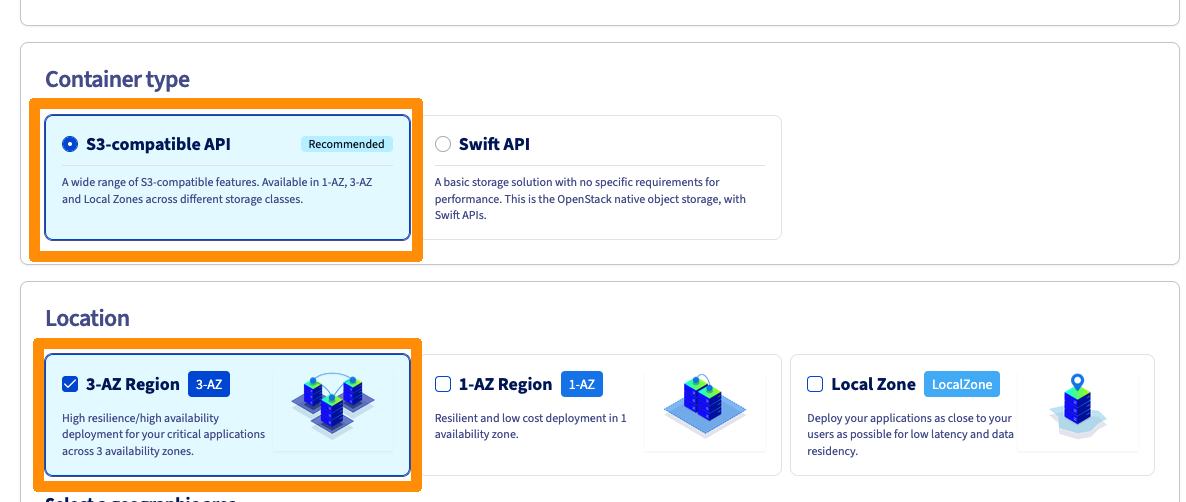
Then select the region:
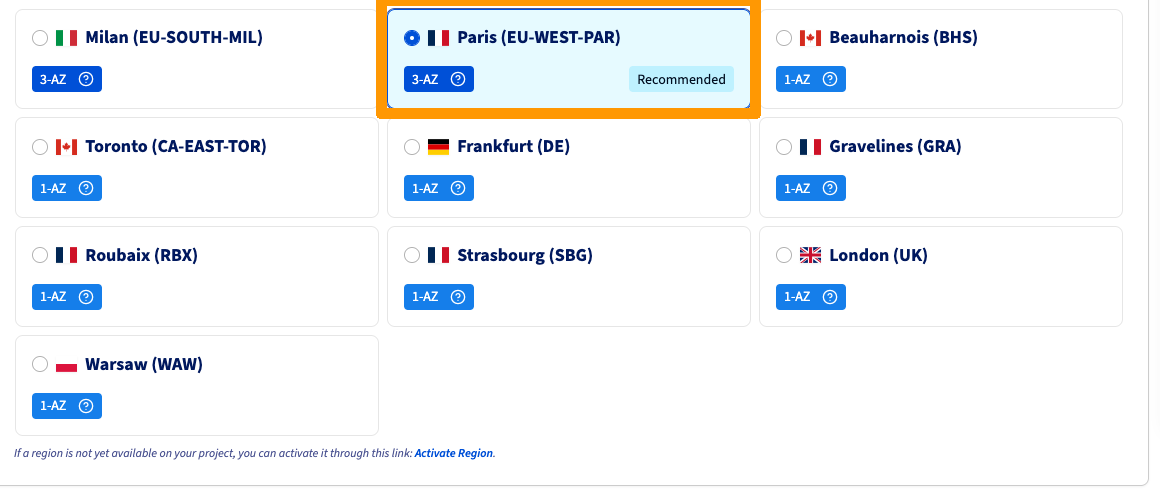
:::warning
Select a region different from that of your cluster.
:::
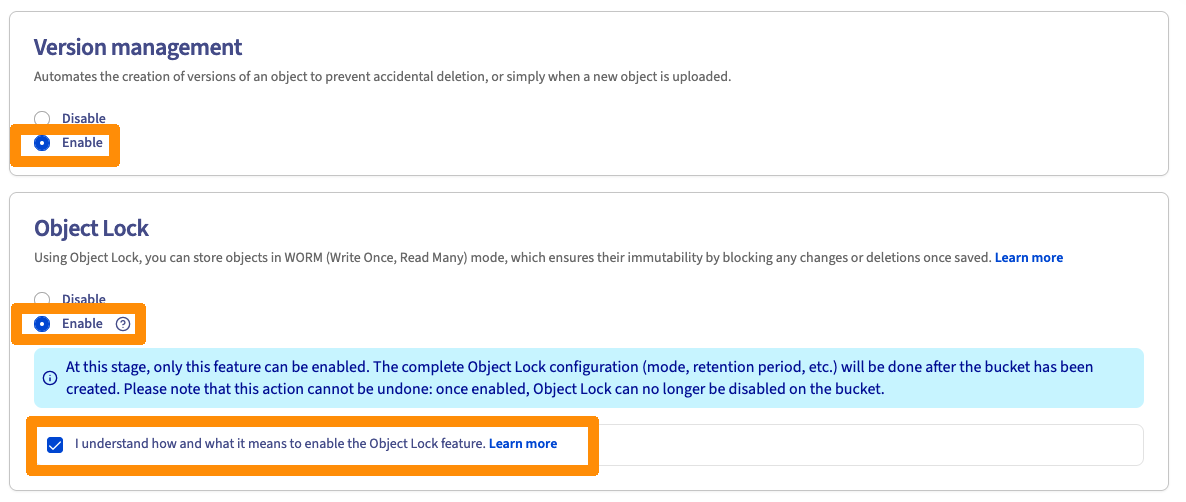
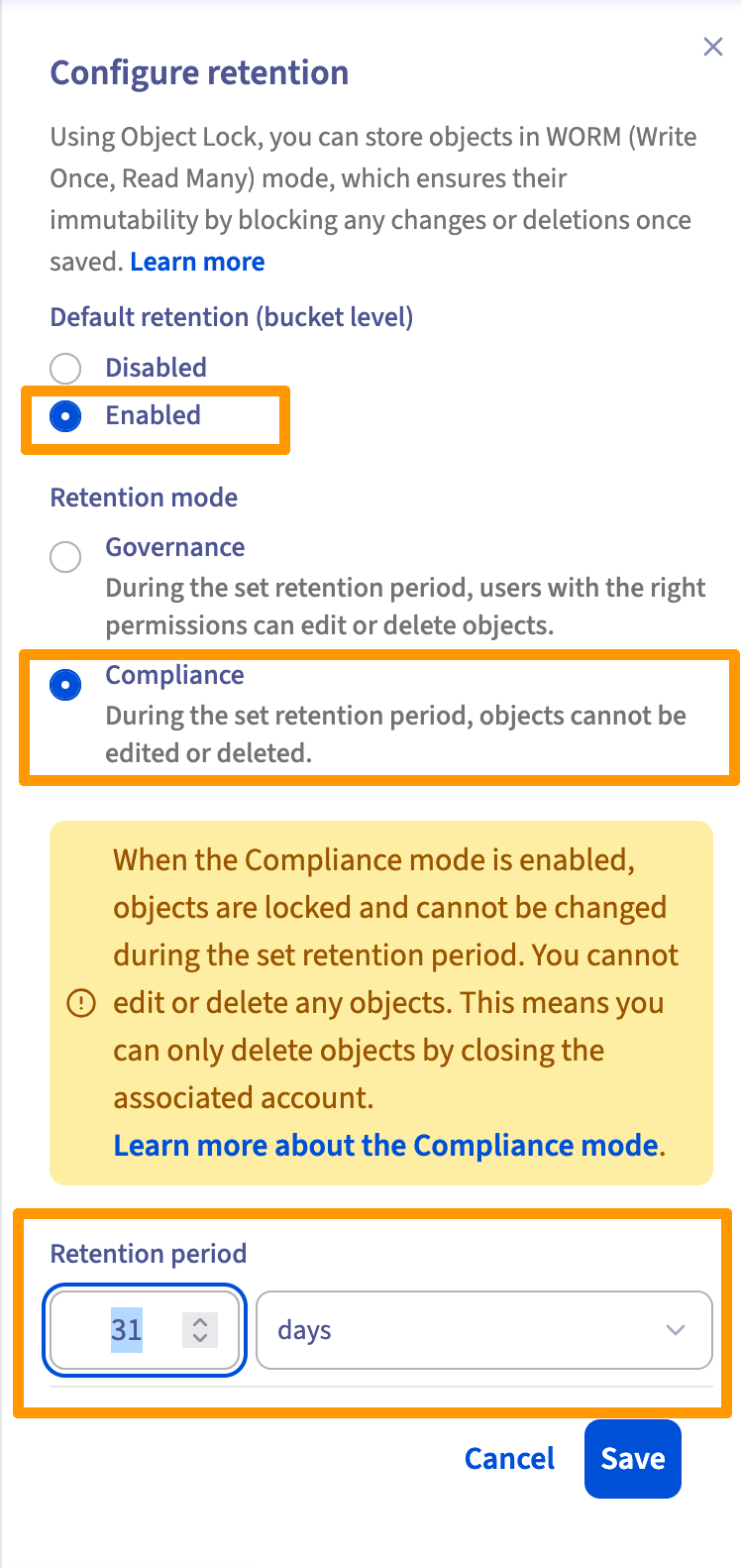
Enable the following features:
Disable encryption:

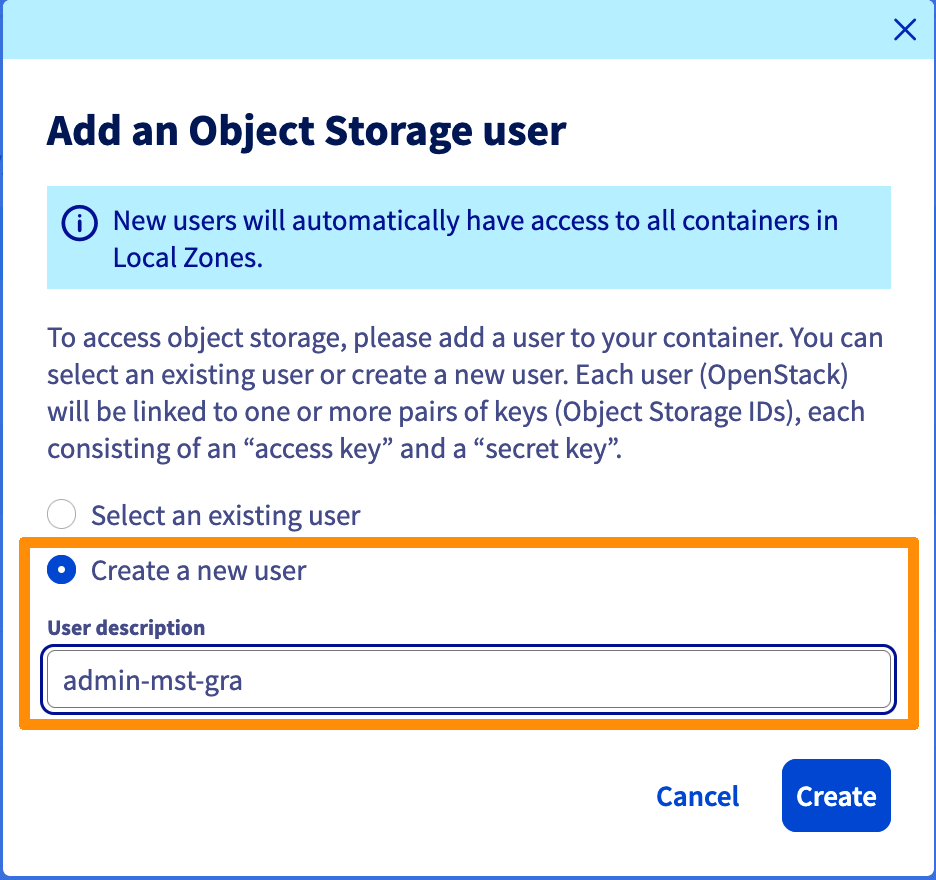
Add an existing user or create a user, for example _admin-mst-gra_:
Note the following information:

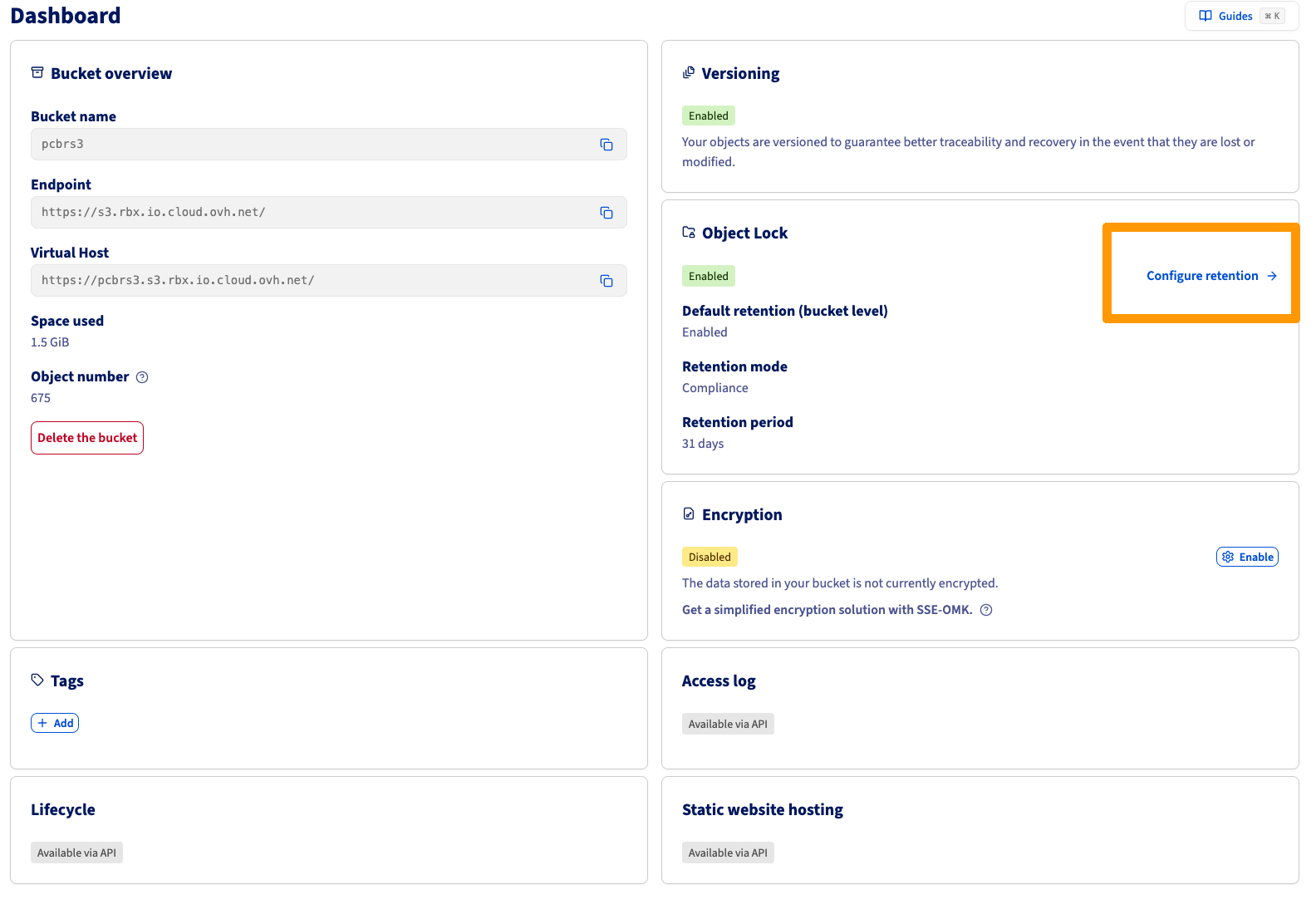
Once the container is created, go to the dashboard and configure the retention:
#### Configuring the "bucket lifecycle"
- Expire current objects version after: 31 days.
- Expire previous/noncurrent objects version after: 1 day.
- Delete expired delete markers: 1 day.
- Delete expired failed/incomplete multipart uploads: 1 day.
Install and configure the AWS CLI client, refer to our guide: [Getting Started with Object Storage](/en/guides/storage-and-backup/object-storage/s3-getting-started-with-object-storage.md).
Run this command by customizing the variables `BUCKET_NAME`, `ENDPOINT_URL` and `PROFILE`:
```bash
BUCKET_NAME='prism-central-backup'
ENDPOINT_URL='https://s3.rbx.io.cloud.ovh.net/'
PROFILE='rbx'
aws s3api put-bucket-lifecycle-configuration \
--bucket ${BUCKET_NAME} \
--lifecycle-configuration '{
"Rules": [
{
"ID": "ExpireCurrentVersions",
"Status": "Enabled",
"Expiration": {
"Days": 31
},
"Filter": {}
},
{
"ID": "ExpireNoncurrentVersions",
"Status": "Enabled",
"NoncurrentVersionExpiration": {
"NoncurrentDays": 1
},
"Filter": {}
},
{
"ID": "DeleteExpiredDeleteMarkers",
"Status": "Enabled",
"Expiration": {
"ExpiredObjectDeleteMarker": true
},
"Filter": {}
},
{
"ID": "AbortIncompleteMultipartUpload",
"Status": "Enabled",
"AbortIncompleteMultipartUpload": {
"DaysAfterInitiation": 1
},
"Filter": {}
}
]
}' \
--endpoint-url ${ENDPOINT_URL} \
--profile ${PROFILE}
```
### Procedure – Configuring Prism Central Point-in-Time Backup
#### Accessing the configuration
1\. Log in to the **Prism Central** web console.
2\. From the **Application Switcher**, select the **Infrastructure** application, then click the **Settings** icon.
3\. Click on **Prism Central Settings**, then navigate to **General > Prism Central Backups**.
4\. Click on **Go to Point-in-Time Backup > Protect Now**.

:::info
The system supports **only one Point-in-Time backup target at a time**.
If a Point-in-Time backup is already configured, the **Protect Now** button does not appear.
:::
#### Configuring the backup target
5\. The **Protect Prism Central** window appears and indicates:
- The services whose data is backed up.
- The services not backed up.
For the detailed list, refer to:
- _Supported Services for PCBR_.
- _Unsupported Services for PCBR – Implementation Considerations and Limitations_.
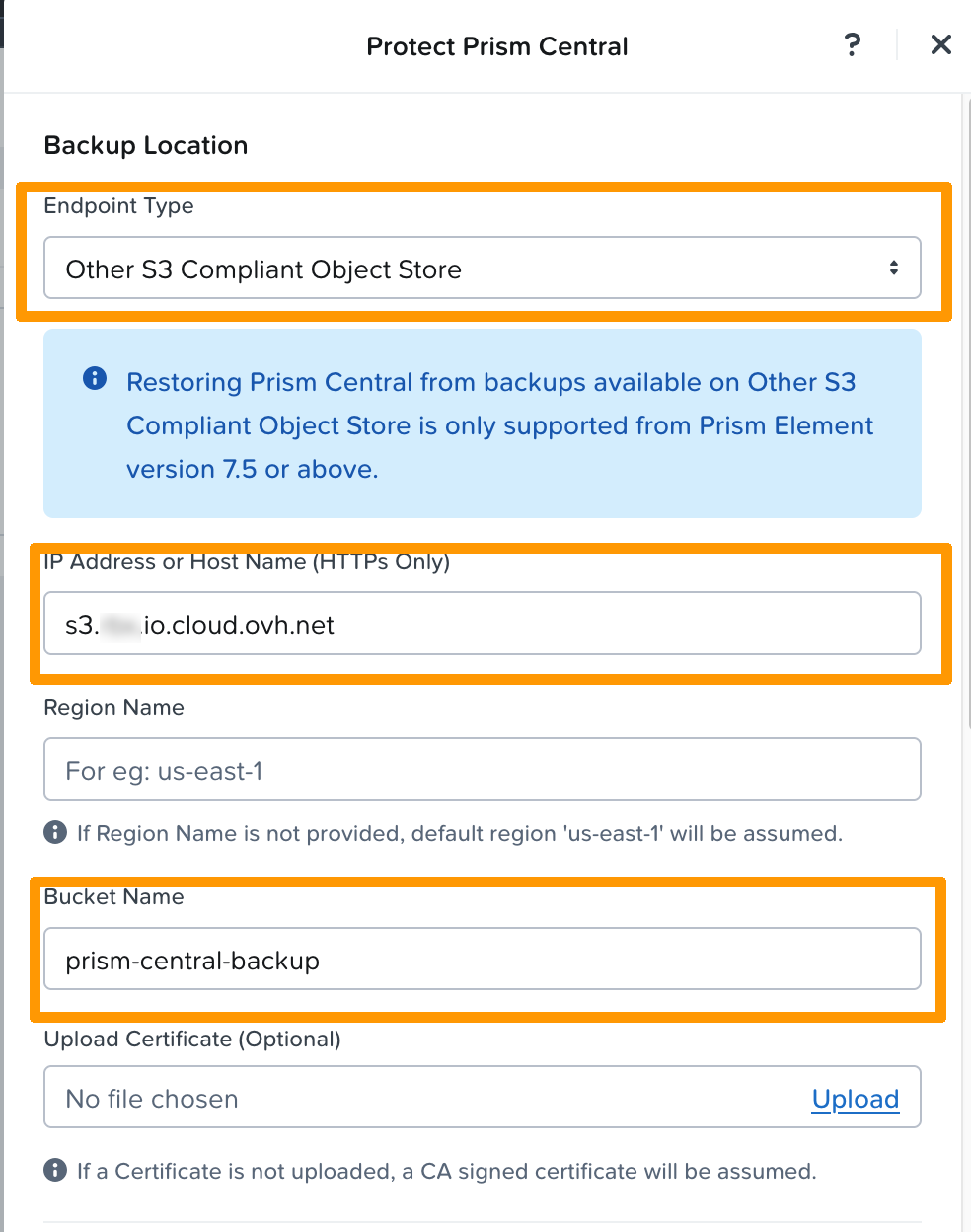
6\. Click on **Continue**, then fill in the following parameters:
- **Endpoint Type**: `Other S3-Compliant Object Store`.
- **IP Address or Host Name (HTTPS Only)**: IP address or hostname of the Object Storage "Endpoint" on the container dashboard (**without https\://**).
- **Bucket Name**: Name of the bucket.
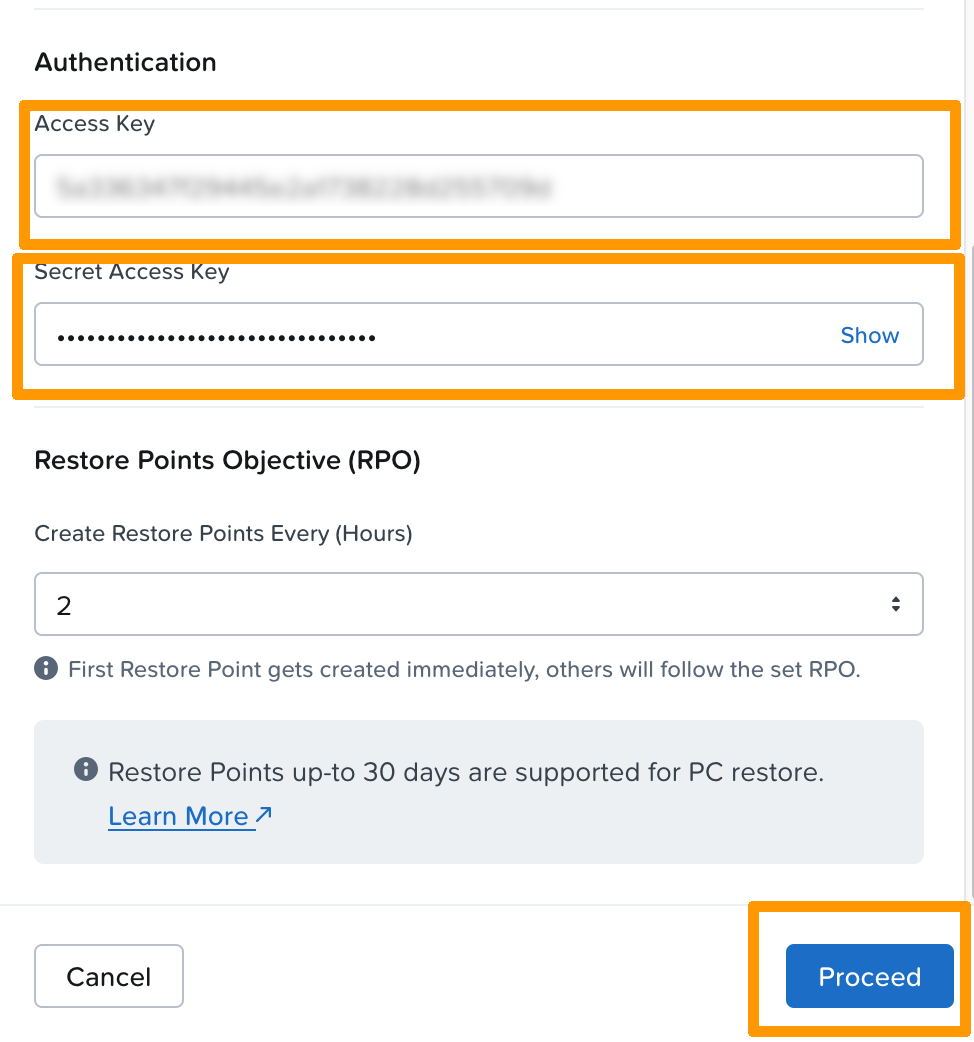
- **Access Key**: Access key.
- **Secret Access Key**: Secret key.
- **Restore Point Objects (RPO)**: Frequency of creation of restore points (in hours).
#### Details on RPO
- The **RPO** corresponds to the frequency of creation of restore points.
- The **first restore point is created immediately**.
- Supported values are: `1, 2, 4, 6, 8, 12 or 24 hours`.
- Up to **30 days of restore points** are retained for Prism Central restoration.
7\. Click on **Proceed**.
#### Synchronization and backup status
The system synchronizes Prism Central configuration data to the S3 bucket.
- During synchronization:
- The displayed status is **Sync in Progress** in the _Prism Central Backups_ dashboard.
- Once synchronization is complete:
- The status changes to **Synced**.
- The date and time of the last synchronization are displayed.
:::info
The first backup starts immediately after validating the S3 target and lasts **at least 15 minutes**.
:::
- After the first backup:
- Synchronizations continue automatically
- Restore points are created according to the configured RPO cycle
## Go Further [](#)
[Prism pc.7.5 - Configuring Point-in-Time Backup to Generic S3-Compliant Object Store official documentation](https://portal.nutanix.com/page/documents/details?targetId=Prism-Central-Guide-vpc_7_5:mul-configuring-pointintime-backup-to-generic-s3-compliant-t.html)
If you need training or technical assistance for the implementation of our solutions, contact your sales representative or click on [this link](https://www.ovhcloud.com/en-gb/professional-services/) to get a quote and request a personalized analysis of your project by our Professional Services team experts.
Join our [community of users](https://community.ovhcloud.com/community/en).
1
: S3 is a trademark owned by Amazon Technologies, Inc. OVHcloud services are not sponsored, approved, or affiliated in any way.