---
title: "End of Plesk and cPanel support for VPS - Ensuring continuity of your services"
description: "Find out the end-of-support dates for the operating systems on your OVHcloud VPS that affect Plesk and cPanel licenses"
url: https://docs.ovhcloud.com/en/guides/bare-metal-cloud/virtual-private-servers/eos-cpanel-plesk
lang: en
lastUpdated: 2025-09-29
---
# End of Plesk and cPanel support for VPS - Ensuring continuity of your services
## Objective
This guide will explain how you can ensure continuity for your services by migrating your OVHcloud VPS to an operating system that is compatible with the latest versions of **Plesk** and **cPanel**, following the end of support announced for several OSs.
**Find the end-of-support dates for the operating systems on your OVHcloud VPS that affect Plesk and cPanel licenses.**
## Requirements
- A [VPS](https://www.ovhcloud.com/en-gb/vps/) solution with a [compatible distribution](https://www.ovhcloud.com/en-gb/vps/os/).
***
### OVHcloud Control Panel Access
- **Direct link:** VPS management
- **Navigation path:** Bare Metal Cloud > Virtual private servers > Select your VPS
***
## Instructions
The **Plesk** and **cPanel** publishers announce the end of support for the following operating systems:
| Operating system | Product | End of Support |
| ---------------- | ------------ | -------------------- |
| Ubuntu 18.04 | Plesk | **1st January 2027** |
| Debian 10 | Plesk | **1st January 2027** |
| CentOS 7 | Plesk/cPanel | **1st January 2027** |
| CloudLinux 7 | Plesk/cPanel | **1st January 2027** |
For more details on support purposes, please refer to the official documentation:
- [Plesk](https://docs.plesk.com/release-notes/obsidian/system-requirements/).
- [cPanel](https://docs.cpanel.net/knowledge-base/cpanel-product/cpanel-deprecation-plan/).
### What can I do concretely?
:::info
From a **security** point of view, continuing to use an unsupported OS exposes you to attacks.
We recommend reading:
- [cPanel recommendations](https://docs.cpanel.net/knowledge-base/security/tips-to-make-your-server-more-secure/).
- [Plesk recommendations](https://docs.plesk.com/en-US/obsidian/administrator-guide/plesk-administration/securing-plesk.59464/).
:::
#### 1. Check your current system
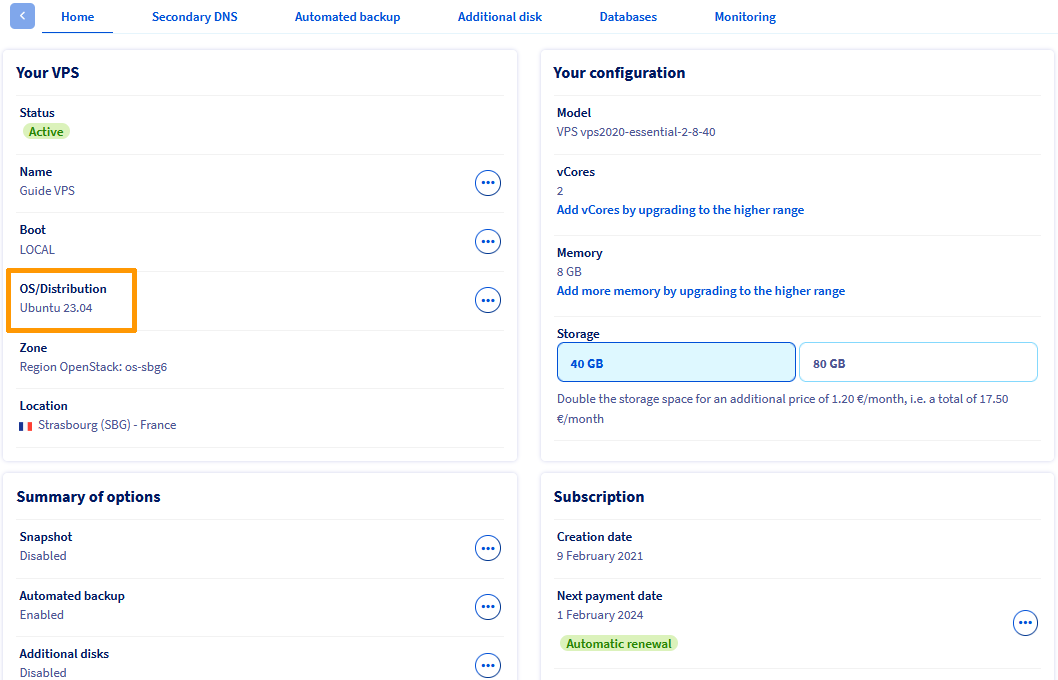
In the `Home
` tab, find the details of your operating system in the `OS/Distribution`
section in the `Your VPS`
box.
#### 2. Identify a compatible OS
If your operating system is part of the OS that will no longer be supported, migrate to a compatible system recommended by the publisher.
Consult the official documentation of supported OSs:
- [List of OSs supported by Plesk](https://docs.plesk.com/release-notes/obsidian/system-requirements/).
- [List of cPanel compatible OSs](https://docs.cpanel.net/installation-guide/system-requirements/).
#### 3. Migrate your service
**Option A — Manual reinstallation**
1. [Back up your data](/en/guides/bare-metal-cloud/virtual-private-servers/using-automated-backups-on-a-vps.md) (web content, database, emails, etc.).
2. Reinstall a compatible OS from the OVHcloud Control Panel by following the `Reinstalling your VPS` section of our guide [How to get started with a VPS](/en/guides/bare-metal-cloud/virtual-private-servers/starting-with-a-vps.md).
3. [Reinstall cPanel](/en/guides/bare-metal-cloud/virtual-private-servers/cpanel.md) or Plesk on the new system.
4. Restore your data from your backups.
**Option B — Migration via Plesk or cPanel**
This method is recommended if you can deploy a new VPS with an updated system alongside the old one.
Order a new VPS with a compatible OS if you have not already done so. [Install cPanel](/en/guides/bare-metal-cloud/virtual-private-servers/cpanel.md) or Plesk.
Use the migration tool of your choice. These tools allow you to automatically transfer your websites, databases, email accounts and configurations from one VPS to another:
- Plesk Migrator - [Official documentation](https://docs.plesk.com/en-US/obsidian/migration-guide/introduction.75496/).
- cPanel Transfer Tool - [Official documentation](https://docs.cpanel.net/whm/transfers/transfer-tool/).
**Option C — On-site update (advanced users)**
If you cannot deploy a new VPS, you can use certain tools to **upgrade your operating system directly**, while keeping Plesk or cPanel installed. This method is intended for advanced users, as it carries risks if executed incorrectly.
- For **Plesk** (switching from CentOS 7 to AlmaLinux 8), use the `centos2alma` script provided by the [official Plesk documentation](https://github.com/plesk/centos2alma). See also detailed instructions in [Plesk support](https://support.plesk.com/hc/en-us/articles/12377714344983).
- For **cPanel** (switching from CentOS 7 to AlmaLinux 8), use the **Elevate** tool provided by the [official cPanel documentation](https://cpanel.github.io/elevate/).
:::info
These tools are not 100% guaranteed and require full backups before proceeding. Also make sure that your VPS has sufficient resources (RAM, CPU, disk).
:::
### Security Best Practices
Regardless of Plesk/cPanel, it is essential to **keep your VPS operating system up to date** to benefit from security patches, software compatibility, and vendor support. If your distribution is **end of life (EOL)**, plan an **upgrade** or **migration** to a still-supported version.
To find out the end-of-life and end-of-support dates for images and operating systems (VPS & Public Cloud), refer to our guide [Public Cloud & VPS - Lifecycle and End-of-Life/Support Announcements for Images and Distributions](/en/guides/public-cloud/compute/image-life-cycle.md).
## Go further [](#)
For specialized services (SEO, development, etc.), contact the [OVHcloud partners](https://partner.ovhcloud.com/en-gb/directory/).
Join our [community of users](https://community.ovhcloud.com/).