---
title: "Filter job execution with the data perimeter"
description: "When executing a data processing job, when you reach large volumes of data to process, you may need to filter the execution of an action"
url: https://docs.ovhcloud.com/de/guides/public-cloud/data-platform/dpe-jobs-perimeter
lang: de
lastUpdated: 2026-09-14
---
> For AI agents: the complete documentation index is available at https://docs.ovhcloud.com/de/llms.txt, the full documentation bundle is available at https://docs.ovhcloud.com/de/llms-full.txt.
# Filter job execution with the data perimeter
## Objective
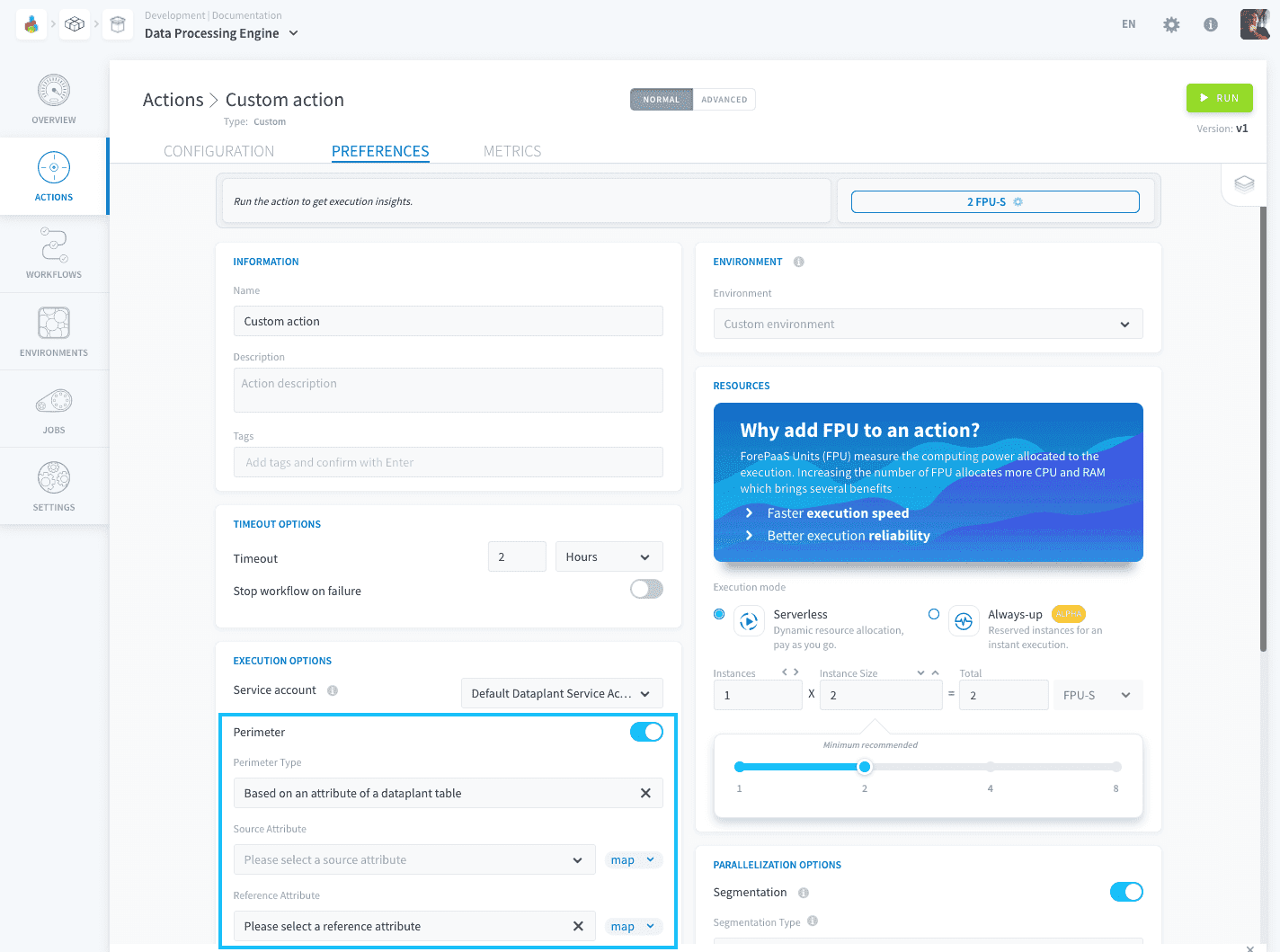
When executing a data processing job, when you reach large volumes of data to process, you may need to filter the execution of an action. The _perimeter_ allows you to **define a field on which to filter the scope of the data to be processed** by the action.
## 1. Based on an attribute of a Project table
If you want to filter an action against a list of data present in the column of [a table from the Lakehouse Manager](https://docs.ovhcloud.com/de/guides/public-cloud/data-platform/lakehouse-manager-tables.md), for example:
| Reference Table | Source Table | Destination Table |
| --------------------------------------------------------------------------------------------------------------------------------------------------------------------------------------------------- | ------------------------------------------------------------------------------------------------------------------------------------------------------------------------------------------------- | --------------------------------------------------------------------------------------------------------------------------------------------------------------------------------------------- |
|  |
|  |
| 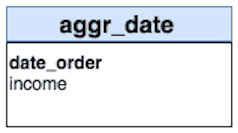 |
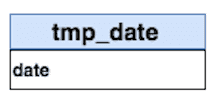
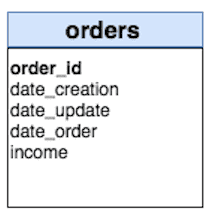
You want to aggregate the data of the "income" attribute contained in the source tab "orders" in the destination table "aggr\_date" grouped by "date\_order". The tmp\_date table contains a list of dates to aggregate from 2019-01-01 to 2019-01-03.
By activating this perimeter mode, this will create a pre-stage automatically which aims to constitute the list of perimeter values contained in the table tmp\_date, attribute date, and will filter the action between all the values found.
### Compatibility
This perimeter option is only compatible with the following actions and sources:
| Action Types | Source Types |
| --------------------------------------------------- | --------------------------------------------------------------------------------------------------------------- |
| Load; Aggregate; Diff; Delete\_Diff; Delete; Custom | **Databases**: MySQL, PostgreSQL, SQLServer, Impala, Hive, BiqQuery, ElasticSearch, Cassandra, Redshift, Oracle |
### Configuration
To configure this perimeter option select _Based on an attribute of a Project table_ in the "Perimeter Type" dropdown.
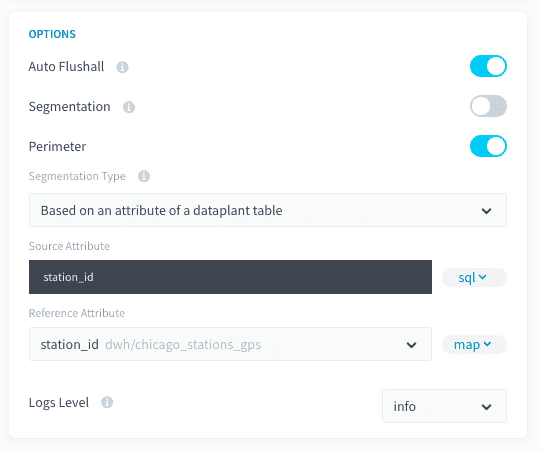
If you are using the advanced mode interface, you will need to add the following fields to your action JSON configuration:
```json
"perimeter": {
"active": true,
"type": "dwh_attributes",
"values": "dwh/default_dataset/tmp_dates/date",
"var_name": "date_order",
"attribute": "date",
"attribute_type": "map"
}
```
## 2. Based on a predefined set of values
This mode lets you enter a list of values to filter a source/table attribute on.
### Compatibility
This perimeter option is only compatible with the following actions and sources:
| Action Types | Source Types |
| --------------------------------------------------- | --------------------------------------------------------------------------------------------------------------- |
| Load; Aggregate; Diff; Delete\_Diff; Delete; Custom | **Databases**: MySQL, PostgreSQL, SQLServer, Impala, Hive, BiqQuery, ElasticSearch, Cassandra, Redshift, Oracle |
### Configuration
To configure this perimeter option select _Based on predefined set_ in the "Perimeter Type" dropdown.
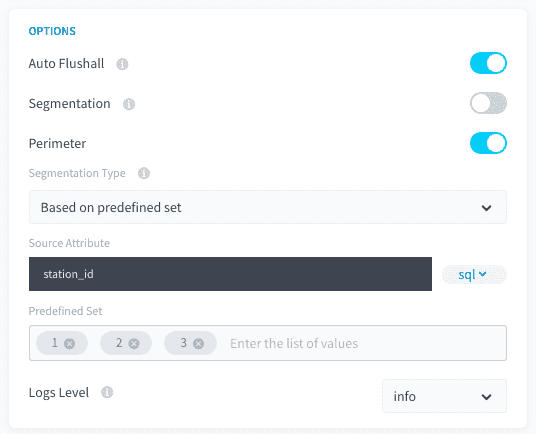
If you are using the advanced mode interface, you will need to add the following fields to your action JSON configuration:
```json
"perimeter": {
"active": true,
"type": "predefined_set",
"var_name": "value_2",
"values": [
"10",
"15"
]
}
```
## 3. Based on the date perimeter of the workflow
If your source data has a date attribute, it is possible to filter the processing of your action against the dates set in your workflow.
### Compatibility
This perimeter option is only compatible with the following actions and sources:
| Action Types | Source Types |
| --------------------------------------------------- | -------------------------------------------------------------------------------------------------------------------------------------------------------------------------------------------------------- |
| Load; Aggregate; Diff; Delete\_Diff; Delete; Custom | **Databases**: MySQL, PostgreSQL, SQLServer, Impala, Hive, BiqQuery, ElasticSearch, Cassandra, Redshift, Oracle; **API**: Facebook, Twitter, Google Analytics, YouTube Private, YouTube Public, LinkedIn |
### Configuration
To configure this perimeter option select _Based on the date perimeter of the workflow_ in the "Perimeter Type" dropdown.
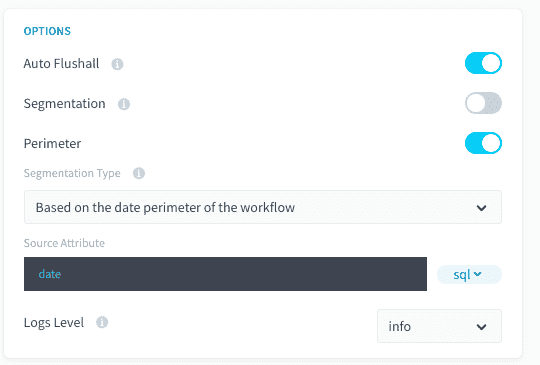
You must switch to advanced mode to configure this option. You simply need to add the following fields to your action JSON configuration:
```json
"perimeter":{
"active":true,
"type":"workflow/dates",
"var_name":"date"
}
```
Check-out more detail about our _Segmentation_ and _Perimeter_ options for DPE action in the **Additional Remarks** articles of the DPE Action settings.
[Segmentation and perimeter vocabulary](https://docs.ovhcloud.com/de/guides/public-cloud/data-platform/landing-page-dpe-jobs.md#segmentation-and-perimeter-vocabulary)
## Go further
If you need training or technical assistance to implement our solutions, contact your sales representative or click on [this link](https://www.ovhcloud.com/de/professional-services/) to get a quote and ask our Professional Services experts for a custom analysis of your project.
Ask questions, give your feedback and interact directly with the team building the Data Platform on the dedicated [Discord channel](https://discord.gg/ovhcloud).
If you need support with your OVHcloud services, create a request in our [Help Centre](https://help.ovhcloud.com/csm?id=csm_get_help).
Join our [community of users](https://community.ovhcloud.com/).
|
You want to aggregate the data of the "income" attribute contained in the source tab "orders" in the destination table "aggr\_date" grouped by "date\_order". The tmp\_date table contains a list of dates to aggregate from 2019-01-01 to 2019-01-03.
By activating this perimeter mode, this will create a pre-stage automatically which aims to constitute the list of perimeter values contained in the table tmp\_date, attribute date, and will filter the action between all the values found.
### Compatibility
This perimeter option is only compatible with the following actions and sources:
| Action Types | Source Types |
| --------------------------------------------------- | --------------------------------------------------------------------------------------------------------------- |
| Load; Aggregate; Diff; Delete\_Diff; Delete; Custom | **Databases**: MySQL, PostgreSQL, SQLServer, Impala, Hive, BiqQuery, ElasticSearch, Cassandra, Redshift, Oracle |
### Configuration
To configure this perimeter option select _Based on an attribute of a Project table_ in the "Perimeter Type" dropdown.

If you are using the advanced mode interface, you will need to add the following fields to your action JSON configuration:
```json
"perimeter": {
"active": true,
"type": "dwh_attributes",
"values": "dwh/default_dataset/tmp_dates/date",
"var_name": "date_order",
"attribute": "date",
"attribute_type": "map"
}
```
## 2. Based on a predefined set of values
This mode lets you enter a list of values to filter a source/table attribute on.
### Compatibility
This perimeter option is only compatible with the following actions and sources:
| Action Types | Source Types |
| --------------------------------------------------- | --------------------------------------------------------------------------------------------------------------- |
| Load; Aggregate; Diff; Delete\_Diff; Delete; Custom | **Databases**: MySQL, PostgreSQL, SQLServer, Impala, Hive, BiqQuery, ElasticSearch, Cassandra, Redshift, Oracle |
### Configuration
To configure this perimeter option select _Based on predefined set_ in the "Perimeter Type" dropdown.

If you are using the advanced mode interface, you will need to add the following fields to your action JSON configuration:
```json
"perimeter": {
"active": true,
"type": "predefined_set",
"var_name": "value_2",
"values": [
"10",
"15"
]
}
```
## 3. Based on the date perimeter of the workflow
If your source data has a date attribute, it is possible to filter the processing of your action against the dates set in your workflow.
### Compatibility
This perimeter option is only compatible with the following actions and sources:
| Action Types | Source Types |
| --------------------------------------------------- | -------------------------------------------------------------------------------------------------------------------------------------------------------------------------------------------------------- |
| Load; Aggregate; Diff; Delete\_Diff; Delete; Custom | **Databases**: MySQL, PostgreSQL, SQLServer, Impala, Hive, BiqQuery, ElasticSearch, Cassandra, Redshift, Oracle; **API**: Facebook, Twitter, Google Analytics, YouTube Private, YouTube Public, LinkedIn |
### Configuration
To configure this perimeter option select _Based on the date perimeter of the workflow_ in the "Perimeter Type" dropdown.

You must switch to advanced mode to configure this option. You simply need to add the following fields to your action JSON configuration:
```json
"perimeter":{
"active":true,
"type":"workflow/dates",
"var_name":"date"
}
```
Check-out more detail about our _Segmentation_ and _Perimeter_ options for DPE action in the **Additional Remarks** articles of the DPE Action settings.
[Segmentation and perimeter vocabulary](https://docs.ovhcloud.com/de/guides/public-cloud/data-platform/landing-page-dpe-jobs.md#segmentation-and-perimeter-vocabulary)
## Go further
If you need training or technical assistance to implement our solutions, contact your sales representative or click on [this link](https://www.ovhcloud.com/de/professional-services/) to get a quote and ask our Professional Services experts for a custom analysis of your project.
Ask questions, give your feedback and interact directly with the team building the Data Platform on the dedicated [Discord channel](https://discord.gg/ovhcloud).
If you need support with your OVHcloud services, create a request in our [Help Centre](https://help.ovhcloud.com/csm?id=csm_get_help).
Join our [community of users](https://community.ovhcloud.com/).