---
title: "'Quick Start: OVHcloud Connect Provider'"
description: "'Walk through the steps to connect to OVHcloud using a third-party network provider'"
url: https://docs.ovhcloud.com/de/guides/network/ovhcloud-connect/occ-provider-control-panel-setup
lang: de
lastUpdated: 2026-06-16
---
# Quick Start: OVHcloud Connect Provider
## Objective
This guide walks you through connecting to OVHcloud using a **third-party network provider** (such as Megaport, Equinix Fabric, or Console Connect). A provider handles the physical connectivity on your behalf, so you don't need to be present in the same data centre as OVHcloud.
## Before you begin
Make sure you have:
- ✅ An **OVHcloud account** with billing configured
- ✅ A contract or account with a **supported provider** (see [Providers](/de/guides/network/ovhcloud-connect/providers.md))
- ✅ A **router** that supports BGP peering (OVHcloud Connect Provider is always a Layer 3 service)
- ✅ A planned **IP addressing scheme** and **ASN**
Log in to your OVHcloud Control Panel
and go to `Network
` > `OVHcloud Connect
`.
## Steps overview
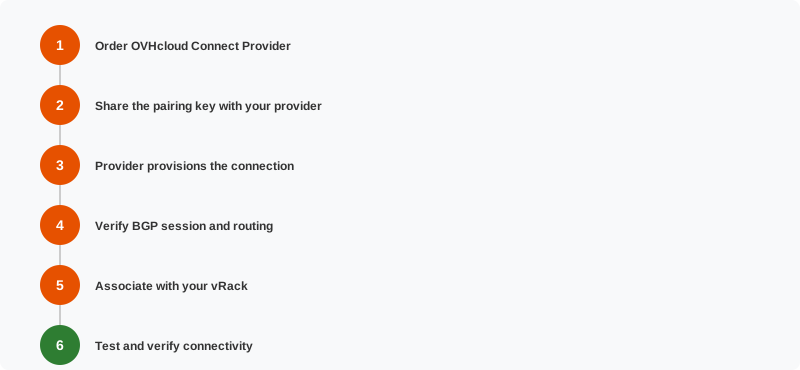
### Step 1 — Order OVHcloud Connect Provider
1. Select OVHcloud Connect Provider.
2. Choose your **provider**, **PoP location**, and **bandwidth**.
3. Review pricing and submit the order.
4. OVHcloud generates a **pairing key** (also called a service key) for your provider.
For detailed steps, see [Order OVHcloud Connect Provider](/de/guides/network/ovhcloud-connect/order-provider.md).
### Step 2 — Share the pairing key
Give the **pairing key** to your provider. This key allows the provider to identify and activate the connection to OVHcloud on your behalf.
- On **Megaport**: create a VXC (Virtual Cross Connect) to OVHcloud and enter the pairing key.
- On **Equinix Fabric**: create a connection to OVHcloud and provide the service key.
- On **Console Connect**: initiate a connection to OVHcloud and use the pairing key.
### Step 3 — Provider provisions the connection
The provider sets up the physical and logical link between their infrastructure and OVHcloud's PoP. This is usually fast (minutes to hours for on-demand providers like Megaport), but timing varies.
You can track the connection status in both the **OVHcloud Control Panel** and your **provider's portal**.
### Step 4 — Associate with your vRack
Link the OVHcloud Connect service to your **vRack**:
1. In the OVHcloud Control Panel, go to vRack.
2. Add your OVHcloud Connect service.
3. Configure the required VLANs and subnets.
See [Associate an OVHcloud Connect to your vRack](/de/guides/network/ovhcloud-connect/associate-vrack.md).
### Step 5 — Verify BGP session and routing
OVHcloud Connect Provider is always a Layer 3 service — BGP peering is established between your router (or your provider's router, depending on your provider offering) and the OVHcloud PoP. Verify in the OVHcloud Control Panel and in your provider's portal that the session is established and routes are being exchanged.
See [Configure OCC L3 with BGP](/de/guides/network/ovhcloud-connect/l3-bgp.md) for detailed guidance.
### Step 6 — Test and verify
| Check | How |
| --------------------- | ---------------------------------------------------------------------------- |
| **Connection status** | Shows "Active" in OVHcloud Control Panel and provider portal |
| **BGP session** | Established — check on your router and in the OVHcloud Control Panel |
| **Routes** | Your prefixes visible on OVHcloud side; OVHcloud routes visible on your side |
| **Ping** | Ping an OVHcloud resource from your network |
| **Traceroute** | Verify traffic goes through the private link, not the Internet |
## Troubleshooting
| Issue | What to check |
| ------------------------------------------------- | ------------------------------------------------------------------------------------------ |
| Connection stuck in "Pending" | Verify the pairing key was entered correctly on the provider's side |
| Provider shows "Active" but OVHcloud shows "Down" | Contact OVHcloud support — there may be a provisioning delay |
| BGP session not establishing | Check peering IPs, ASN, and VLAN ID on both your router and the OVHcloud PoP configuration |
| High latency or packet loss | Check provider's network status page; run traceroute to identify where delays occur |
## What's next?
- For a self-managed connection, see [Quick Start: Direct Connection](/de/guides/network/ovhcloud-connect/occ-direct-control-panel-setup.md)
- Set up [monitoring](/de/guides/network/ovhcloud-connect/monitor.md)
- Explore [resilient architectures](/de/guides/network/ovhcloud-connect/resilient-architecture.md)
## Go further
For training or technical assistance implementing our solutions, contact your sales representative or visit our [Professional Services](https://www.ovhcloud.com/de/professional-services/) page to request a quote and have your project analyzed by our experts.
Join our [community of users](https://community.ovhcloud.com/).